

• News
  • Idefisk
  • Tools
  • Tutorials
  • Forum
  • Reviews
  • VoIP Providers
  • Archives
  • Gallery
ZOIPER SIP softphone
Back to Tutorials

1.3. Installation on CentOS

The first step that you should make is to you to choose which version of Asterisk you want to install.
* Asterisk 1.2 - the stable version
* Asterisk 1.4 - the version that is currently in beta testing
When you know which version you want to install download the according packages.

Note that we will install also libpri and zaptel packages. They are optional for Asterisk but if you want to use Asterisk with MeetMe (see MeetMe application and meetme.conf) or to use MusicOnHold you'll have to install zaptel. The TDMoE cards will also need the zaptel module in order to work correctly. If you will use PRI cards you'll have to install libpri module.

For Asterisk 1.2:
* Asterisk sources
* Zaptel sources
* Libpri sources


For Asterisk 1.4:
* Asterisk sources
* Zaptel sources
* Libpri sources


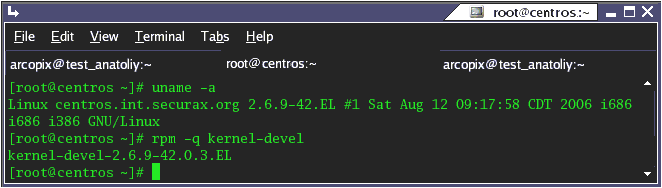
Now check the exact version of your kernel. You can achieve this by typing `uname -a`. The output should be something like this: `Linux luser 2.6.17-1.2142_EL #1 Tue Jul 11 22:41:14 EDT 2006 i686 i686 i386 GNU/Linux`. Check if you are using 2.6 or 2.4 kernel. Notice that. We'll need this info later. You should check if you have installed the kernel sources (for the current version of the kernel) on your machine. To achieve this type `rpm -q kernel-devel` The output of the screen should be something like this:
running_at_console.gif

Note that if you don't have kernel sources you should install them. You can use yum again: `yum install kernel-devel`. If you use this command yum will install the sources for your current version of the kernel.

It is time to check for the availability of some other packages:
rpm -q bison
rpm -q bison-devel
rpm -q ncurses
rpm -q ncurses-devel
rpm -q zlib
rpm -q zlib-devel
rpm -q openssl
rpm -q openssl-devel
rpm -q gnutls-devel
rpm -q gcc
rpm -q gcc-c++
 

If any of those packages are not installed install them by using yum
yum install bison
yum install bison-devel
yum install ncurses
yum install ncurses-devel
yum install zlib
yum install zlib-devel
yum install openssl
yum install openssl-devel
yum install gnutls-devel
yum install gcc
yum install gcc-c++
 

If yum is unable to find one or more of these packages, try your luck with PBone. You should find the required packages there. When you download them, install them with either of those:
rpm -i PACKAGE.rpm
rpm -Uvh PACKAGE.rpm


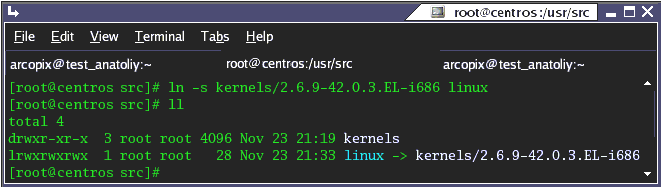
CentOS doesn't install the kernel sources into the /usr/src/linux directory as is written in Zaptel's and Asterisk's Makefile. Go to `/usr/src` and create a link named 'linux' to your kernel sources directory (the default place for your kernel's sources is /usr/src/kernels/...). The result should look like this:
asterisk_installation_compilation_fedora_image274366.gif

Now extract the downloaded sources by the command `tar -vxzf PACKAGE.tar.gz`, where PACKAGE.tar.gz are the packages that we downloaded (libpri, zaptel and asterisk itself).

Installing Libpri:
cd /path/to/source/libpri
make
make install
 

Installing Zaptel:
cd /usr/src/asterisk/zaptel
# if you have a 2.4 kernel you should type just make
make
# if you have a 2.6 kernel you should type make linux26
make linux26 - if you have a 2.6 kernel
make install
 

Installing Asterisk:
cd /usr/src/asterisk/asterisk
# before making Asterisk you have to install mpg123 package (to be able to play mp3 files for music on hold).
make mpg123
# for Asterisk v1.4 you should start configure script
./configure
make
make install
make samples


In order to verify the asterisk installation start your asterisk daemon by typing `safe_asterisk` and connect to its console by typing `asterisk -vvvvvr`. Now reload the entire configuration by typing `reload`.

 
User Comments
virendra sharma (virendra83 at gmail dot com)
25 April 2008 10:59:12
hi i just joined a company who deal with asterisk
Tulume (sandugo333 at yahoo dot com)
05 October 2007 09:29:21
Please Help me find the solution.
Here's the error on Installation


[root@ASTERISK ~]# cd /usr/src/libpri
[root@ASTERISK libpri]# make
make: Nothing to be done for `all'.
[root@ASTERISK libpri]# make install
mkdir -p /usr/lib
mkdir -p /usr/include
install -m 644 libpri.h /usr/include
install -m 755 libpri.so.1.0 /usr/lib
if [ -x /usr/sbin/sestatus ] && ( /usr/sbin/sestatus | grep "SELinux status:" | grep -q "enabled"); then restorecon -v /usr/lib/libpri.so.1.0; fi
( cd /usr/lib ; ln -sf libpri.so.1.0 libpri.so ; ln -sf libpri.so.1.0 libpri.so.1 )
install -m 644 libpri.a /usr/lib
if test $(id -u) = 0; then /sbin/ldconfig -n /usr/lib; fi
[root@ASTERISK libpri]#


Thanks...
Tom (TomSmall at charter dot net)
21 May 2007 23:12:34
I get the following errors when installing Libpri:
[root@l3cl006 libpri-1.4.0]# make
CC=gcc ./mkdep -Wall -Werror -Wstrict-prototypes -Wmissing-prototypes -g `ls *.c`
gcc -Wall -Werror -Wstrict-prototypes -Wmissing-prototypes -g -c -o copy_string.o copy_string.c
gcc -Wall -Werror -Wstrict-prototypes -Wmissing-prototypes -g -c -o pri.o pri.c
gcc -Wall -Werror -Wstrict-prototypes -Wmissing-prototypes -g -c -o q921.o q921.c
gcc -Wall -Werror -Wstrict-prototypes -Wmissing-prototypes -g -c -o prisched.o prisched.c
gcc -Wall -Werror -Wstrict-prototypes -Wmissing-prototypes -g -c -o q931.o q931.c
gcc -Wall -Werror -Wstrict-prototypes -Wmissing-prototypes -g -c -o pri_facility.o pri_facility.c
ar rcs libpri.a copy_string.o pri.o q921.o prisched.o q931.o pri_facility.o
ranlib libpri.a
gcc -fPIC -Wall -Werror -Wstrict-prototypes -Wmissing-prototypes -g -o copy_string.lo -c copy_string.c
gcc -fPIC -Wall -Werror -Wstrict-prototypes -Wmissing-prototypes -g -o pri.lo -c pri.c
gcc -fPIC -Wall -Werror -Wstrict-prototypes -Wmissing-prototypes -g -o q921.lo -c q921.c
gcc -fPIC -Wall -Werror -Wstrict-prototypes -Wmissing-prototypes -g -o prisched.lo -c prisched.c
gcc -fPIC -Wall -Werror -Wstrict-prototypes -Wmissing-prototypes -g -o q931.lo -c q931.c
gcc -fPIC -Wall -Werror -Wstrict-prototypes -Wmissing-prototypes -g -o pri_facility.lo -c pri_facility.c
gcc -shared -Wl,-hlibpri.so.1.0 -o libpri.so.1.0 copy_string.lo pri.lo q921.lo prisched.lo q931.lo pri_facility.lo
/sbin/ldconfig -n .
ln -sf libpri.so.1.0 libpri.so
ln -sf libpri.so.1.0 libpri.so.1

Anyone know why??
leo and andres (leo_ at leo dot com)
16 May 2007 00:48:20
In Centos 5 Kernel the private data member of struct inode hasn't changed.
Then in line 164 approximately of xpp/xbus-core.c file, we must change
#if LINUX_VERSION_CODE < KERNEL_VERSION(2,6,19)
by
#if LINUX_VERSION_CODE < KERNEL_VERSION(2,6,18)

That's all.
Leo (leo_ at leo dot com)
16 May 2007 00:43:51
In Centos 5 Kernel the private data member of struct inode hasn't changed.
Then in line 164 approximately of xpp/xbus-core.c file, we must change
#if LINUX_VERSION_CODE < KERNEL_VERSION(2,6,19)
by
#if LINUX_VERSION_CODE < KERNEL_VERSION(2,6,18)

That's all.
Alfredo (astivalet at gmail dot com)
05 May 2007 21:19:56
i have problems installing Zaptel i made all the steps.

[root@asterisk zaptel-1.2.17.1]# uname -a
Linux asterisk.localhost.com 2.6.18-8.1.3.el5 #1 SMP Mon Apr 30 19:55:44 EDT 2007 i686 i686 i386 GNU/Linux

root@asterisk src]# ll
total 13504
drwxr-xr-x 25 root root 4096 abr 24 17:49 asterisk-1.2.18
-rw-r--r-- 1 root root 10621790 abr 24 19:06 asterisk-1.2-current.tar.gz
drwxr-xr-x 3 root root 4096 may 5 13:22 kernels
drwxr-xr-x 2 1000 1000 4096 oct 17 2006 libpri-1.2.4
-rw-r--r-- 1 root root 76663 oct 18 2006 libpri-1.2-current.tar.gz
lrwxrwxrwx 1 root root 31 may 5 14:05 linux -> /kernels/2.6.18-8.1.3.el5-i686/
drwxr-xr-x 9 root root 4096 may 5 14:08 zaptel-1.2.17.1
-rw-r--r-- 1 root root 3047448 abr 25 11:10 zaptel-1.2-current.tar.gz

when i tried to compiling zaptel i have the next error:

[root@asterisk zaptel-1.2.17.1]# make linux26
make: *** No hay ninguna regla para construir el objetivo `linux26'. Alto.

Whit make apears:


[root@asterisk zaptel-1.2.17.1]# make
Compile xpp (version trunk-r3495)
CC [M] /usr/src/zaptel-1.2.17.1/xpp/card_fxo.o
CC [M] /usr/src/zaptel-1.2.17.1/xpp/card_fxs.o
CC [M] /usr/src/zaptel-1.2.17.1/xpp/xbus-core.o
/usr/src/zaptel-1.2.17.1/xpp/xbus-core.c: En la función ‘debugfs_open’:
/usr/src/zaptel-1.2.17.1/xpp/xbus-core.c:171: error: ‘struct inode’ no tiene un miembro llamado ‘u’
make[3]: *** [/usr/src/zaptel-1.2.17.1/xpp/xbus-core.o] Error 1
make[2]: *** [/usr/src/zaptel-1.2.17.1/xpp] Error 2
make[1]: *** [_module_/usr/src/zaptel-1.2.17.1] Error 2
make[1]: se sale del directorio `/usr/src/kernels/2.6.18-8.1.3.el5-i686'
make: *** [all] Error 2

Thanks for your help


hannibal_ (hannibal at hannibal dot com)
02 May 2007 10:26:10
[root@localhost zaptel-1.4.2.1]# make linux26
grep: /include/linux/autoconf.h: Aucun fichier ou répertoire de ce type
make[1]: Entering directory `/usr/src/zaptel-1.4.2.1/menuselect'
make[2]: Entering directory `/usr/src/zaptel-1.4.2.1/menuselect'
make[3]: Entering directory `/usr/src/zaptel-1.4.2.1/menuselect/mxml'
autoconf
make[3]: autoconf : commande introuvable
make[3]: *** [config.h] Erreur 127
make[3]: Leaving directory `/usr/src/zaptel-1.4.2.1/menuselect/mxml'
make[2]: *** [mxml/libmxml.a] Erreur 2
make[2]: Leaving directory `/usr/src/zaptel-1.4.2.1/menuselect'
make[1]: *** [all] Erreur 2
make[1]: Leaving directory `/usr/src/zaptel-1.4.2.1/menuselect'
make: *** [menuselect/menuselect] Erreur 2
[root@localhost zaptel-1.4.2.1]# make install
grep: /include/linux/autoconf.h: Aucun fichier ou répertoire de ce type
make[1]: Entering directory `/usr/src/zaptel-1.4.2.1/menuselect'
make[2]: Entering directory `/usr/src/zaptel-1.4.2.1/menuselect'
make[3]: Entering directory `/usr/src/zaptel-1.4.2.1/menuselect/mxml'
autoconf
make[3]: autoconf : commande introuvable
make[3]: *** [config.h] Erreur 127
make[3]: Leaving directory `/usr/src/zaptel-1.4.2.1/menuselect/mxml'
make[2]: *** [mxml/libmxml.a] Erreur 2
make[2]: Leaving directory `/usr/src/zaptel-1.4.2.1/menuselect'
make[1]: *** [all] Erreur 2
make[1]: Leaving directory `/usr/src/zaptel-1.4.2.1/menuselect'
make: *** [menuselect/menuselect] Erreur 2
Byambabayar (bbr62003 at yahoo dot com)
07 April 2007 06:33:46
[root@localhost asterisk-1.4.2]# make
make: Warning: File `Makefile' has modification time 2.9e+08 s in the future
****
**** The configure script must be executed before running 'make'.
****
make: *** [makeopts] Error 1
eijal (systemworksmsn at hotmail dot com)
21 March 2007 01:08:40
I THINK IN THE REQUIREMENTS, IT'S SOMETHING MISSING. BECAUSE I INSTALLED CENTOS 4.4 WITH MINIMAL INSTALLATION, AND THEN I INSTALLED WITH YUM ALL THE REQUERIMENTS THAT YOU SAY.
EVERY GOES WELL, BUT WHEN I TRY TO USE THE X100P CARD THERE ARE ISSUES, THIS IS THE ERROR:

# modprobe zaptel
FATAL: Module zaptel not found.

AND I CAN'T SOLVE IT. BUT WHEN I INSTALL ALL DEVELOPMENT TOOLS FOR CENTOS THERE IS NOT ANY PROBLEMS WITH THE modprobe zaptel
Izzy (idatoo at yahoo dot com)
21 February 2007 18:29:15
The author doesn't mention how to get menuselect working and how to use it.
This is where I am stuck, as I try to run menuselect and receive the following msg:
Unable to open 'menuselect-tree' for reading!
Error parsing 'menuselect-tree'!
John (jwhelan at proxito dot com)
16 February 2007 16:51:34
It looks as though with zaptel 1.2.13 you can no longer build with target linux26.

I tried and got

[john@bender zaptel-1.2.13]# make linux26
make: *** No rule to make target `linux26'. Stop.

A Make && Make install ran just fine, and I could load ztdummy with modprobe afterwards.

The readme.linux26 file is still present, and still instructs to do "make linux26", though.
Blanc (toussainty at hotmail dot com)
26 January 2007 20:47:08
c'est bpon ce uqe vous faiytes
Mats (mats dot o dot karlsson at gmail dot com)
07 January 2007 11:43:44
I like to add both zaptel and asterisk to the standard init procedure in CentOS/RHEL.

To do this add:
make config

then you can start, stop and restart with the service command, ex.:
service asterisk start

and also do a :
chkconfig --add asterisk
chkconfig --level 345 asterisk on

and the same for zaptel.

This will start zaptel and asterisk in the boot procedure.
Arcopix (arcopix at gmail dot com)
04 January 2007 16:38:48
I've updated the links for Asterisk 1.4.0
Pierre (pierre at forestcitynetwerxs dot com)
01 January 2007 08:30:58
Ditto for Zaptel link above:<br />
http://ftp.digium.com/pub/zaptel/<br />
<br />
and Libpri:<br />
http://ftp.digium.com/pub/libpri/
Pierre Marceau (pierre at forestcitynetwerxs dot com)
01 January 2007 08:19:49
The link (above) to Asterisk 1.4 Beta 3 works but there are now newer versions available. Check it out:

http://ftp.digium.com/pub/asterisk/releases/
Chris (chris at empirecom dot on dot ca)
07 December 2006 16:16:53
Hi,
I have always been under the impression that as of Asterisk 1.2.X, when the asterisk-addons package is installed there is no need for mpg123 anymore. This was just for asterisk 1.0. I have not been installing it for quite some time and have been using mp3 files for MOH.
Thanks,
Chris
eslam (eshesh_1211 at hotmai dot com)
06 December 2006 20:57:22
hi
Lacho (support at asteriskguru dot com)
05 December 2006 18:43:23
Hi Tracy,

In version 1.4 the compilation process is a little bit different. There are no make mpg123 option. You could use the native format_mp3 which is coming with the asterisk-addons package.

Regards
Lacho
Tracy (tracyphillips at yahoo dot com)
05 December 2006 17:38:52
I am trying to get asterisk 1.4 working and in the tutorial, it says to 'make mpg124' for Music On Hold.

I cd to the asterisk directory and this is what I get:

[root@localhost asterisk-1.4.0-beta3]# make mpg123
make: *** No rule to make target `mpg123'. Stop.

Any ideas?
 
Add Comment
Name:
Email:
Comment:
In order to prevent automatic posting on our website, we kindly request you to type in the number you see in the picture below.
Image Verification:
 

Latest Headlines:

  • Asterisk 1.4.20-rc1 Now Available
    section: Asterisk
  • Zaptel 1.4.10.1 Released
    section: Asterisk
  • Asterisk 1.2.28, 1.4.19.1, and 1.6.0-beta8 Released
    section: Asterisk
  • Truphone to have its own SIM card? Inevitable.
    section: technology
  • ISPBX launches Asterisk Appliances with drag-and-drop GUI
    section: Asterisk third party
  • News Archives (older news)

Latest Tutorials:

  • VMAuthenticate (dialplan application)
    added 01/Mar/2008 15:57
  • Siptronic ST-530
    added 06/Nov/2007 17:57
  • Siemens C455 IP hardphone
    added 05/Nov/2007 10:24
  • Zoiper
    added 22/Oct/2007 17:53
  • Grandstream GXP-2020
    added 15/Oct/2007 18:17

Latest Comments:

  • very good...
    tutorial: X-Lite - SIP softphone
  • pleas if you can help me i have call ma...
    tutorial: Cisco 7960 IP Phone - SIP firmware version
  • thanks very much......
    tutorial: Asterisk Voicemail
  • I have the same problem as tetsuo191 wit...
    tutorial: ast_rtp_read: Unknown RTP codec X received
  • this is not the place to ask for techinc...
    tutorial: Softphones
 
contact us at: support@asteriskguru.com - asterisKGuru.com © all rights reserved   |   *asterisk is registered trademark of © Digium™