


3.1.17. Microsoft Windows Messenger 5.1
1. Introduction
Microsoft Windows Messenger 5.1 provides ability to communicate with all of the Microsoft's instant messaging (IM) sevices and ability to make calls using the Session Initiation Protocol (SIP).
Download it here.
2. Prerequisites
To be able to use Microsoft Windows Messenger 5.1 you need working Asterisk PBX.
3. Asterisk PBX configuration
SIP.conf
First we have to create/obtain a SIP account on Asterisk server. To accomplish this we need to modify sip.conf configuration file:
[wmn]
username=wmn
secret=wmn
type=friend
host=dynamic
context=training
allow=all
Now we have one user wmn with password wmn. What else do we need? Some extensions...
Extesions.conf
After creating the SIP users, let's make it possible to connect each other. To do this we need to add some extension numbers in the extensions.conf configuration file:
[training]
exten => 001,1,Dial(SIP/anatoliy) ; The SNOM-200 hardphone
exten => 001,2,HangUp()
exten => 002,1,Dial(SIP/wmn) ; Windows Messenger 5.1 softphone
exten => 002,2,HangUp()
Now we have context [training] - this is the context that we have used for the SIP accounts configuration in the confi sip.conf.
For more information about how to make the configurations in the Asterisk's configuration files please read our tutorial about the Configuring IP Phones for use with Asterisk
4. Windows Messenger 5.1 configuration

Now let's configure the Windows Messenger 5.1. Choose the only available option "Click here to sign in" (above). After choosing this step you will see the window that promts you to choose which service you are goint to use. To be able to use Asterisk PBX, we choose SIP Communications Service (below) ...
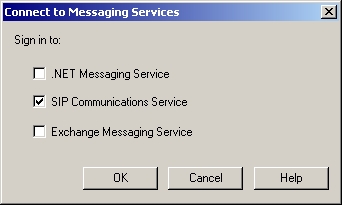
... after choosing the desired services - click OK ...
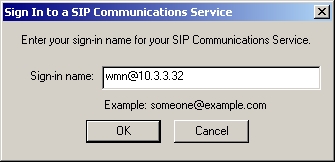
... What name to enter for the "Sign-In name"? Here you can enter whatever you like for sign-in name. The name in the example will be wmn@10.3.3.32 ...
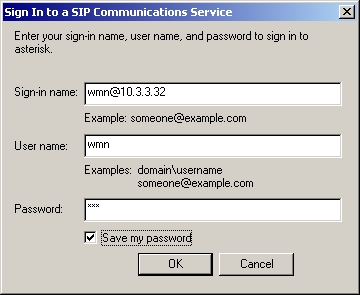
... Next we have to enter the username and the password for the account, that are specified in the sip.conf ...
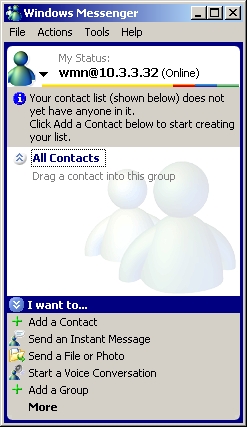
... finally, we have a Windows Messenger 5.1 with registered SIP account.
5. Dialing Out and Accepting Calls
Now let's make some calls :
Making outgoing calls
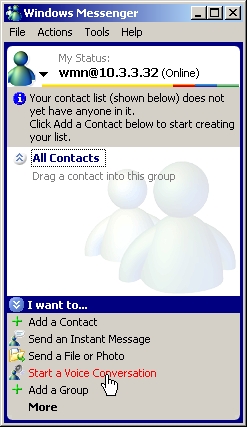
How to make a cal? It's easy, choose "Start a Voice Conversation" ...
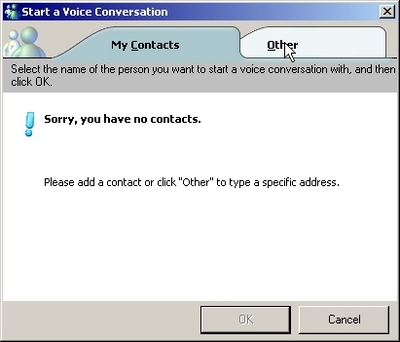
... choose "Other" ...
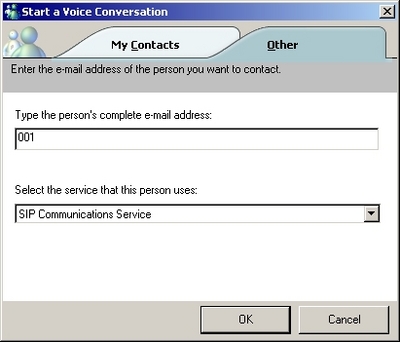
... Now you can enter the number you want to dial. You can enter only the extensions number (above), or you can specified the exact SIP URI (below) ,..
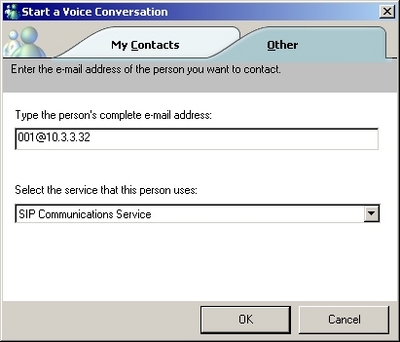
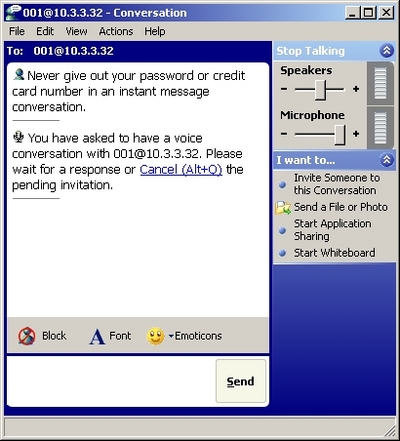
... At the end just press OK, and the window below will apear. To cancel the call just press Alt+Q or use the option in the upper right corner Stop talking.
Incoming calls
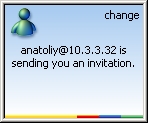
If you have incoming, the above tiny window will apear in the bottom-right corner of your screen. You can see who is calling you ...
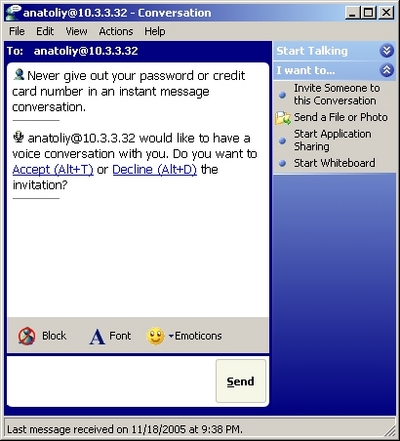
... To accept the call you can use the keyboard combination Alt+T or the option located in the upper-right corner Start talking (above)...
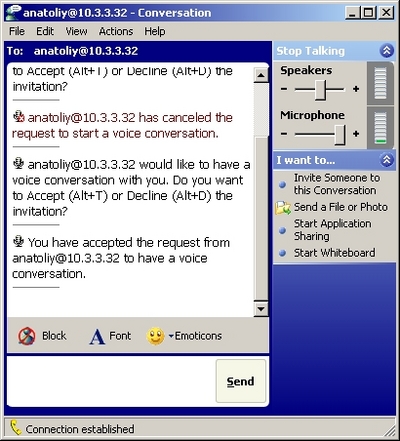
...To hangup the call just press the option Stop talking in the upper-right corner.
Microsoft Windows Messenger 5.1 provides ability to communicate with all of the Microsoft's instant messaging (IM) sevices and ability to make calls using the Session Initiation Protocol (SIP).
2. Prerequisites
To be able to use Microsoft Windows Messenger 5.1 you need working Asterisk PBX.
3. Asterisk PBX configuration
SIP.conf
First we have to create/obtain a SIP account on Asterisk server. To accomplish this we need to modify sip.conf configuration file:
[wmn]
username=wmn
secret=wmn
type=friend
host=dynamic
context=training
allow=all
Now we have one user wmn with password wmn. What else do we need? Some extensions...
Note: For the testing purpose we are going to use SNOM 200 hardphone (SIP), you can find tutorial how to configure the phone here.
Extesions.conf
After creating the SIP users, let's make it possible to connect each other. To do this we need to add some extension numbers in the extensions.conf configuration file:
[training]
exten => 001,1,Dial(SIP/anatoliy) ; The SNOM-200 hardphone
exten => 001,2,HangUp()
exten => 002,1,Dial(SIP/wmn) ; Windows Messenger 5.1 softphone
exten => 002,2,HangUp()
Now we have context [training] - this is the context that we have used for the SIP accounts configuration in the confi sip.conf.
For more information about how to make the configurations in the Asterisk's configuration files please read our tutorial about the Configuring IP Phones for use with Asterisk
4. Windows Messenger 5.1 configuration
Now let's configure the Windows Messenger 5.1. Choose the only available option "Click here to sign in" (above). After choosing this step you will see the window that promts you to choose which service you are goint to use. To be able to use Asterisk PBX, we choose SIP Communications Service (below) ...
... after choosing the desired services - click OK ...
... What name to enter for the "Sign-In name"? Here you can enter whatever you like for sign-in name. The name in the example will be wmn@10.3.3.32 ...
... Next we have to enter the username and the password for the account, that are specified in the sip.conf ...
... finally, we have a Windows Messenger 5.1 with registered SIP account.
5. Dialing Out and Accepting Calls
Now let's make some calls :
Making outgoing calls
How to make a cal? It's easy, choose "Start a Voice Conversation" ...
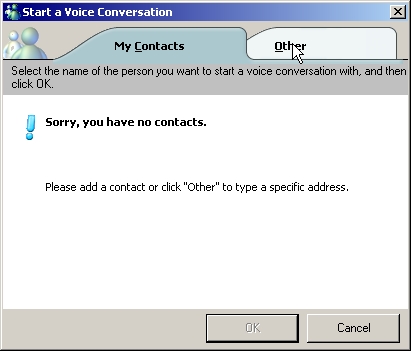
... choose "Other" ...
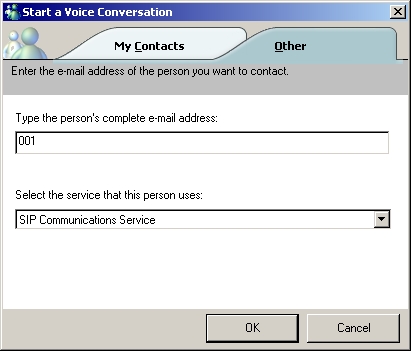
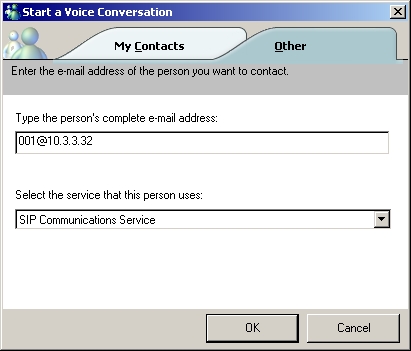
... Now you can enter the number you want to dial. You can enter only the extensions number (above), or you can specified the exact SIP URI (below) ,..
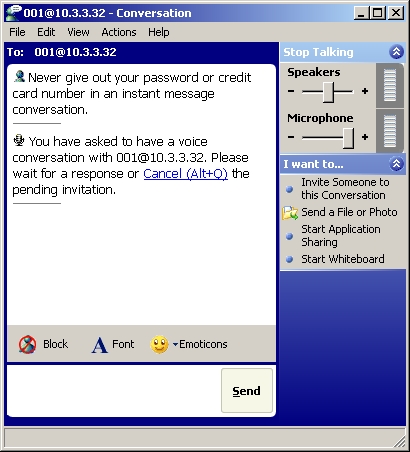
... At the end just press OK, and the window below will apear. To cancel the call just press Alt+Q or use the option in the upper right corner Stop talking.
Incoming calls
If you have incoming, the above tiny window will apear in the bottom-right corner of your screen. You can see who is calling you ...
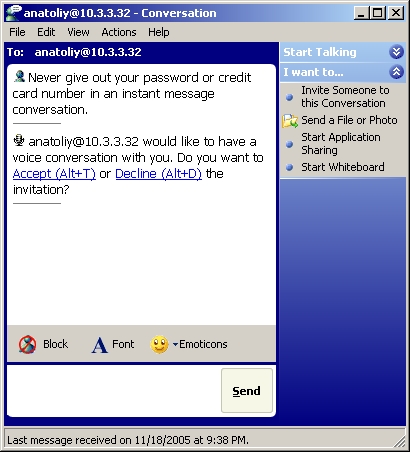
... To accept the call you can use the keyboard combination Alt+T or the option located in the upper-right corner Start talking (above)...
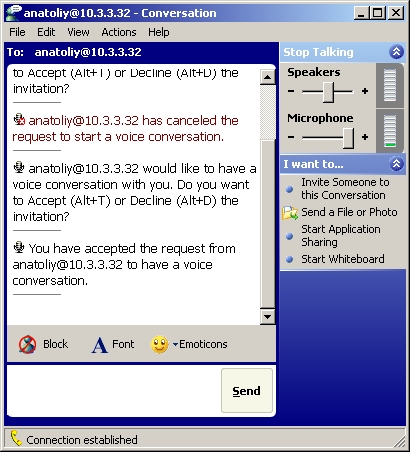
...To hangup the call just press the option Stop talking in the upper-right corner.
| Add Comment |
Latest Headlines:
-
T.38 faxing with Zoiper 2.15 is now easier than ever
section: voip software
-
Asterisk 1.4.21 Released
section: Asterisk
-
Asterisk 1.4.20 Released
section: Asterisk
-
Asterisk 1.4.20-rc2 Released
section: Asterisk
-
Asterisk 1.4.20-rc1 Now Available
section: Asterisk
- News Archives (older news)
Latest Tutorials:
-
Sending Fax from Zoiper to Zoiper using T.38
added 08/Dec/2008 18:16
-
VMAuthenticate (dialplan application)
added 01/Mar/2008 15:57
-
Siptronic ST-530
added 06/Nov/2007 17:57
-
Siemens C455 IP hardphone
added 05/Nov/2007 10:24
-
Zoiper
added 22/Oct/2007 17:53
Latest Comments:
-
https://www.imdb.com/list/ls540404256/
...
tutorial: Request to schedule in the past?!?!
-
https://www.ttvets.org/forum/main/commen...
tutorial: General Installation
-
https://github.com/In-Broad-Daylight-chi...
tutorial: General Installation
-
https://m.facebook.com/media/set/?set=a....
tutorial: General Installation
-
白日之下 电...
tutorial: Background (dialplan application)