


6.1.2.73. SayNumber (dialplan application)
1.SayNumber is a dial plan application that says a given number. The number should be passed to the application as first parameter.
NOTE: This application is valid for Asterisk version 1.0.9 and above.
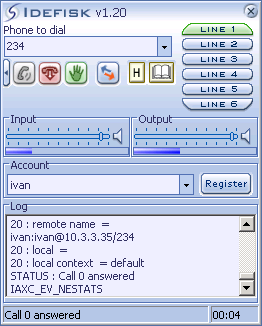
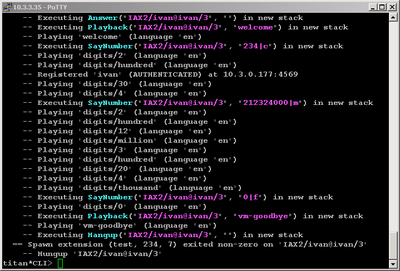
2.The application in CLI
3. Additional information
4. Similar dialplan applications
SayAlpha()
SayPhonetic()
SayUnixTime()
SayNumber()
NOTE: This application is valid for Asterisk version 1.0.9 and above.
Syntax:
SayNumber(number,[gender]) : the number that you want to be said by the application must be given as first argument and the gender that says the number is optional second argument.
Possible values for the number argument are each number from 0 to 999.999.999.
Possible values for the gender argument are: “m” = male, “f” = female, “c” = computer. The default gender if none is declared is male. The default language is English, you can change it by the application SetLanguage().
Possible values for the number argument are each number from 0 to 999.999.999.
Possible values for the gender argument are: “m” = male, “f” = female, “c” = computer. The default gender if none is declared is male. The default language is English, you can change it by the application SetLanguage().
Purpose and usage
This purpose of this dial plan application is to say a given number. Here in the application some variables also can be assigned. When the number is said the application with next priority will be executed.
Below you can find an example for the possible usage of the application.
Below you can find an example for the possible usage of the application.
Prerequisites
First of all you need to install Asterisk PBX. Afterwards you need to configure at least one user in iax.conf, sip.conf or mgcp.conf – the protocol you are going to use depends on you or of the phone you are using. After this you need to write some extensions in extensions.conf.
In this tutorial I will use Idefisk softphone that is an IAX client. You can download it by clicking here. Tutorial showing how it works and configuration support can be found here.
In this tutorial I will use Idefisk softphone that is an IAX client. You can download it by clicking here. Tutorial showing how it works and configuration support can be found here.
Asterisk PBX configurations
NOTE: This is just an example of what you can use this application for. Of course you can use it and for other purposes.
When you have installed and working Asterisk PBX you will need some user to test this application. If you do not have any registered in iax.conf you may add the following one. If you are not going to user Idefisk Softphone and iax.conf you have to register the user in the same way in sip.conf, h323.conf or mgcp.conf – depending on the protocol you are using.
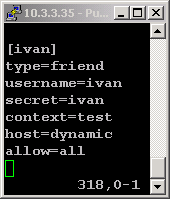
Above I registered a user [ivan] with the properties:
We now have a user that can use the context test from extensions.conf. So now we need some dial plan application in [test] in extensions.conf.
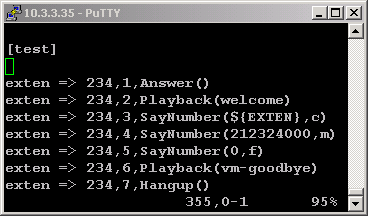
Here is the application in extensions.conf:
When you have installed and working Asterisk PBX you will need some user to test this application. If you do not have any registered in iax.conf you may add the following one. If you are not going to user Idefisk Softphone and iax.conf you have to register the user in the same way in sip.conf, h323.conf or mgcp.conf – depending on the protocol you are using.
Above I registered a user [ivan] with the properties:
type=friend (type might be user – just can call, peer – just can be called and friend – can call and can be called)
username=ivan – this is the user which must authenticate when connecting to the Asterisk PBX server
context=test is the context from extensions.conf which the user can access (including any other context which is/are included in this one)
secret=ivan is the password with which the user must authenticate when connecting to the Asterisk server
host=dynamic means that the host for this user is dynamic and he/she can connect to Asterisk PBX from different computers (host may be defined with static ip address)
Allow=all means that all audio codecs are allowed (You can allow certain codecs as well as disallow others)
We now have a user that can use the context test from extensions.conf. So now we need some dial plan application in [test] in extensions.conf.
Here is the application in extensions.conf:
exten => 234,1,Answer()
the call is answered
exten => 234,2,Playback(welcome)
welcome message is played on playback
exten => 234,3,SayNumber (${EXTEN},c)
${EXTEN} is predefined variable that returns the extension you have dialed
exten => 234,4,SayNumber(212324000,m)
the number 212.234.000 is said
exten => 234,5,SayNumber(0,f)
zero is said
exten => 234,6,Playback(vm-goodbye)
goodbye message is played
exten => 234,7,Hangup()
hangup() closes the line
2.The application in CLI
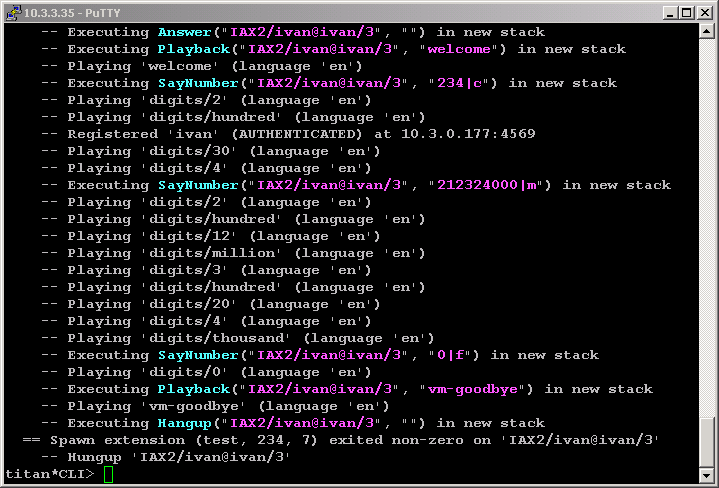
3. Additional information
For more information about extensions.conf you can check here.
For more information about iax.conf you can check here.
This application is tested with our IAX softphone Idefisk. You can download it from here. For more information about this softphone please read our tutorial.
If you would like to test this application with the SIP channel you can read our tutorials about the SIP Softphones to learn how to configure them to work with Asterisk PBX
For more information about iax.conf you can check here.
This application is tested with our IAX softphone Idefisk. You can download it from here. For more information about this softphone please read our tutorial.
If you would like to test this application with the SIP channel you can read our tutorials about the SIP Softphones to learn how to configure them to work with Asterisk PBX
4. Similar dialplan applications
SayAlpha()
SayPhonetic()
SayUnixTime()
SayNumber()
| Add Comment |
Latest Headlines:
-
T.38 faxing with Zoiper 2.15 is now easier than ever
section: voip software
-
Asterisk 1.4.21 Released
section: Asterisk
-
Asterisk 1.4.20 Released
section: Asterisk
-
Asterisk 1.4.20-rc2 Released
section: Asterisk
-
Asterisk 1.4.20-rc1 Now Available
section: Asterisk
- News Archives (older news)
Latest Tutorials:
-
Sending Fax from Zoiper to Zoiper using T.38
added 08/Dec/2008 18:16
-
VMAuthenticate (dialplan application)
added 01/Mar/2008 15:57
-
Siptronic ST-530
added 06/Nov/2007 17:57
-
Siemens C455 IP hardphone
added 05/Nov/2007 10:24
-
Zoiper
added 22/Oct/2007 17:53
Latest Comments:
-
https://letterboxd.com/piksy123/list/oye...
tutorial: Installation on Slackware
-
https://bento.me/videa-a-majomember-onli...
tutorial: Configuring IP Phones for use with Asterisk
-
https://bento.me/sledujte-krotitele-duch...
tutorial: Configuring IP Phones for use with Asterisk
-
Women s world cup inside the infamous nu...
tutorial: With PostgreSQL
-
https://bento.me/-verpelicula-culpa-tuya...
tutorial: Request to schedule in the past?!?!