


6.2. adsi.conf
This is the Analog Display Services Interface Configuration file for Asterisk. (Not to be mistaken with DISA, which is something completely unrelated).
1.1. Introduction to ADSI:
1.2. Prequisites
1.3. ADSI capable phones:
1.4. Configuration of asterisk for ADSI
1.5. ADSI scripts
1.6. Other ADSI related features
1.6.1.: Voicemail
The comedian mail has some support for ADSI, if you want to use this with your phone, you will need to alter the codes again, but this time in the sources for comedian mail.
static char *adapp = "CoMa"; --> this value is the FDN as seen before
static char *adsec = "_AST"; --> this value is the security code as above.
This means that if you change the brand of phone, you will need to alter this again and recompile. And you probably will be unable to use different brands of phones at the same time.
1.6.2.: Send text to an ADSI phone
If you have a look at this google cache, you will find an application to send messages to your ADSI phone from the asterisk dialplan.
1.6.3.: Call Parking
Asterisk can send some information to your ADSI phone when you park a call, to enable this, edit features.conf and type the line adsipark = yes
See also:
- ADSIProg
- zapata.conf
References:
ADSI definition on techtarget.com
ADSI questions for a 390 ADSI Phone - part 1
ADSI questions for a 390 ADSI Phone - part 2
some more info on ADSI
ADSI FAQ
Another mail archive
ADSI unlock codes
Application to send text to the ADSI Phone
ADSI programming guide - WebSphere Voice Response for AIX V3.1 Programming for the ADSI feature
thread with some more info on locking codes
1.1. Introduction to ADSI:
The file is located in the /etc/asterisk/ directory.
ADSI (Analog Display Services Interface) is a protocol for enabling alternate voice and data services over the analog telephone network, such as sending data to a display at the ADSI phone
It also allow for running simple interactive scripts on the ADSI phone, such as Call Waiting Deluxe, an application that displays the name and number of an incoming call while you are on the phone.
Not only will the phone display the number, it will also ask you what to do with it, including switching to the new call, forwarding the new call to your voice mail, putting the new caller on hold, playing a recorded message, or dropping the current call and switching to the new call.
Other ADSI applications include:
ADSI (Analog Display Services Interface) is a protocol for enabling alternate voice and data services over the analog telephone network, such as sending data to a display at the ADSI phone
It also allow for running simple interactive scripts on the ADSI phone, such as Call Waiting Deluxe, an application that displays the name and number of an incoming call while you are on the phone.
Not only will the phone display the number, it will also ask you what to do with it, including switching to the new call, forwarding the new call to your voice mail, putting the new caller on hold, playing a recorded message, or dropping the current call and switching to the new call.
Other ADSI applications include:
- Visual voice mail: the display of telephone voice mail menu options and a list of your voice mail messages
- Visual directory: a service that allows you to locate the telephone number of an individual or business and, possibly at extra charge, to download the address of that individual to your screen phone
- E-mail browsing: allowing you to send and receive e-mail messages via an ADSI-enabled device.
- Schedule-based services: faxing abilities, notification of incoming e-mail messages, home banking, ticket purchasing, and access to train and plane schedules.
- Visual directory: a service that allows you to locate the telephone number of an individual or business and, possibly at extra charge, to download the address of that individual to your screen phone
- E-mail browsing: allowing you to send and receive e-mail messages via an ADSI-enabled device.
- Schedule-based services: faxing abilities, notification of incoming e-mail messages, home banking, ticket purchasing, and access to train and plane schedules.
1.2. Prequisites
- Asterisk
- a configured TDM card, fxo card or combination of channel bank and E1/T1 card.
- ADSI Capable phone
- a configured TDM card, fxo card or combination of channel bank and E1/T1 card.
- ADSI Capable phone
1.3. ADSI capable phones:
- Sayson/Aastra 390/480e
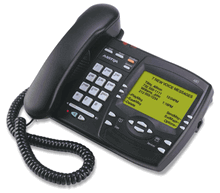
- Cybiolink P-1 ADSI analog phone
- Nortel Vista 350/380
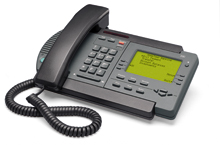
- Lucent Technologies' ADSI SpeakerPhone 980
- CybioTronics CY-2135-BH CybioLink
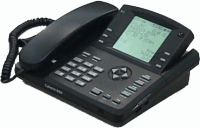
- Fanstel ST2112
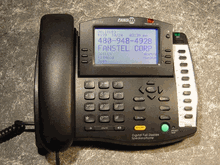
(If you know more, please leave a comment and we will add them).
- Cybiolink P-1 ADSI analog phone
- Nortel Vista 350/380
- Lucent Technologies' ADSI SpeakerPhone 980
- CybioTronics CY-2135-BH CybioLink
- Fanstel ST2112
(If you know more, please leave a comment and we will add them).
1.4. Configuration of asterisk for ADSI
Saddly, we don't have an ADSI phone in our lab, so all the information here is gathered on the internet and untested.
The main ADSI configuration file is called ADSI.conf, a sample ADSI script is included in the asterisk sources as asterisk.adsi.
To use ADSI, you need to enable ADSI on this specific zaptel line.
(So first you will need to read up on how to configure zaptel for your card and then enable ADSI on the channel your phone is connected to by adding the line adsi=yes to the configuration for this channel in zapata.conf.
I don't think you need to touch anything in adsi.conf, the sample configuration file looks as the snippet below:
For the speeddial option, you will need to look at the res_adsi.c source code, i suppose its name,number or number,name.
The main ADSI configuration file is called ADSI.conf, a sample ADSI script is included in the asterisk sources as asterisk.adsi.
To use ADSI, you need to enable ADSI on this specific zaptel line.
(So first you will need to read up on how to configure zaptel for your card and then enable ADSI on the channel your phone is connected to by adding the line adsi=yes to the configuration for this channel in zapata.conf.
; ADSI (Analog Display Services Interface) can be enabled on a per-channel
; basis if you have (or may have) ADSI compatible CPE equipment
;
;adsi=yes
; basis if you have (or may have) ADSI compatible CPE equipment
;
;adsi=yes
I don't think you need to touch anything in adsi.conf, the sample configuration file looks as the snippet below:
;
; Sample ADSI Configuration file
;
[intro]
alignment = center; alignment on the screen, valid values are: l(eft), r(ight) i(indent?). All others are recognized as centered.
greeting => Welcome to the ; Some greeting, don't know when its shown on the phone
greeting => Asterisk
greeting => Open Source PBX
maxretries = 3 ; number of times to retry sending to the ADSI phone
[speeddial]
--please look at res_adsi.c
; Sample ADSI Configuration file
;
[intro]
alignment = center; alignment on the screen, valid values are: l(eft), r(ight) i(indent?). All others are recognized as centered.
greeting => Welcome to the ; Some greeting, don't know when its shown on the phone
greeting => Asterisk
greeting => Open Source PBX
maxretries = 3 ; number of times to retry sending to the ADSI phone
[speeddial]
--please look at res_adsi.c
For the speeddial option, you will need to look at the res_adsi.c source code, i suppose its name,number or number,name.
1.5. ADSI scripts
Asterisk comes with two ADSI scripts included,
asterisk.adsi
telcordia-1.adsi
These scripts need to run on the phone, asterisk can upload them to the phone for you.
To do so, you will need to create a specific extension, which will call the ADSIProg application. When you call this extension with your phone, asterisk will upload the script to the phone.
If no parameter is giving to ADSIProg, it will upload the default script, asterisk.adsi.
Before you upload any scripts, you might need to alter them and change two values for you specific phone:
For a list with codes, have a look here
If your phone has multiple slots, you can upload one script per slot. (each slot will have a different FDN).
asterisk.adsi
telcordia-1.adsi
These scripts need to run on the phone, asterisk can upload them to the phone for you.
To do so, you will need to create a specific extension, which will call the ADSIProg application. When you call this extension with your phone, asterisk will upload the script to the phone.
exten => 1234,1,ADSIProg(telcordia-1.adsi);
exten => 1234,2,Hangup;
exten => 1234,2,Hangup;
If no parameter is giving to ADSIProg, it will upload the default script, asterisk.adsi.
Before you upload any scripts, you might need to alter them and change two values for you specific phone:
SECURITY 0X9BDBF7AC ; Security code
FDN 0x0000000F ; Descriptor number
FDN 0x0000000F ; Descriptor number
For a list with codes, have a look here
If your phone has multiple slots, you can upload one script per slot. (each slot will have a different FDN).
1.6. Other ADSI related features
1.6.1.: Voicemail
The comedian mail has some support for ADSI, if you want to use this with your phone, you will need to alter the codes again, but this time in the sources for comedian mail.
static char *adapp = "CoMa"; --> this value is the FDN as seen before
static char *adsec = "_AST"; --> this value is the security code as above.
This means that if you change the brand of phone, you will need to alter this again and recompile. And you probably will be unable to use different brands of phones at the same time.
1.6.2.: Send text to an ADSI phone
If you have a look at this google cache, you will find an application to send messages to your ADSI phone from the asterisk dialplan.
1.6.3.: Call Parking
Asterisk can send some information to your ADSI phone when you park a call, to enable this, edit features.conf and type the line adsipark = yes
See also:
- ADSIProg
- zapata.conf
References:
ADSI definition on techtarget.com
ADSI questions for a 390 ADSI Phone - part 1
ADSI questions for a 390 ADSI Phone - part 2
some more info on ADSI
ADSI FAQ
Another mail archive
ADSI unlock codes
Application to send text to the ADSI Phone
ADSI programming guide - WebSphere Voice Response for AIX V3.1 Programming for the ADSI feature
thread with some more info on locking codes
| Add Comment |
Latest Headlines:
-
T.38 faxing with Zoiper 2.15 is now easier than ever
section: voip software
-
Asterisk 1.4.21 Released
section: Asterisk
-
Asterisk 1.4.20 Released
section: Asterisk
-
Asterisk 1.4.20-rc2 Released
section: Asterisk
-
Asterisk 1.4.20-rc1 Now Available
section: Asterisk
- News Archives (older news)
Latest Tutorials:
-
Sending Fax from Zoiper to Zoiper using T.38
added 08/Dec/2008 18:16
-
VMAuthenticate (dialplan application)
added 01/Mar/2008 15:57
-
Siptronic ST-530
added 06/Nov/2007 17:57
-
Siemens C455 IP hardphone
added 05/Nov/2007 10:24
-
Zoiper
added 22/Oct/2007 17:53
Latest Comments:
-
лечение запоя
<a href=http...
tutorial: VMAuthenticate (dialplan application)
-
https://www.minecraftforum.net/members...
tutorial: Playback (dialplan application)
-
https://bnd.lc/46nyz/
https://bnd.lc/2N...
tutorial: General Installation
-
https://artistlinkplus.com/listing/avata...
tutorial: SIP with NAT or Firewalls
-
https://www.mapmyrun.com/routes/view/665...
tutorial: RemoveQueueMember (dialplan application)