


19.1. Queues
1. General information about telephony queues
2. Introducing to the Asterisk queues
3. Simple queue
If any in the system dial 78, the call will be put to the queue named simple-queue.
4. Dynamic dial plan
5. Queues tricks
6. Queue addons
Queues are used by the PSTN systems to queue their customer’s requests until free resources become available. This means that if incoming traffic intensity levels exceed available capacity, customer’s calls are here no longer lost; the customers instead wait in line until they can be served.[4] This method is used in queueing customers for the next available operator.
A queueing discipline determines the manner in which the exchange handles calls from customers.[4] It defines the way they will be served, the order in which they are served, and the way in which resources are divided between the customers.
2. Introducing to the Asterisk queues
Enough information about the queues in general.
Let’s talk about the queues which we will discuss in the tutorial – Asterisk queues.
At the beginning let’s say what are these Asterisk call queues. Asterisk queues are wealth! You can do anything with the incoming calls using the queues. Have you ever wanted to route incoming calls to another person, or to a []voicemail, without the knowledge of the customer? With the Asterisk queues you can balance incoming call workload among your employees. Have you ever wanted one person to have more priority in the calls, or a whole group of callers?
The main Asterisk configuration files are located in /etc/asterisk/. In this directory is located queues.conf - /etc/asterisk/queues.conf.
There are two possible ways to configure the settings in this file.
The first one, is the so called "static" way. For this configuration you do not need the agents.conf file.
You will say directly, which users to answer the incoming call. In our example, we have created a context with the name [simple-queue]. In this context we have written the following: member => IAX2/idefisk and member => IAX2/idefisk-rulez. This means that these agents will be responsible for the answering of the incoming calls in the queue simple-queue. In the same way you can add even more than two users, which you would like to answer in this queue. However in our case we will have only two users. The advantage of this method, is that you do not have to use the AgentLogin or the AgentCallbackLogin applications in order to log the users in the queue. It will be logged in automatically, when it turns on its phone. The disadvantage is that these users can use, only the phones, on which they are registered. That is why the method is called "static". You can see a screenshot below.
The other way is the so called "dynamic" way. For this configuration you will need the agents.conf file.
Unlike the "static" method, here we have to write not the name of the user, but the number of the agent, as written in the agents.conf file. In our example we have written the following: member => Agent/8888. This means that we want the agent with number 8888, to answer the incoming calls in the queue test. If you decide to use this method you have to add in your dialplan either the AgentLogin or the AgentCallbackLogin application. This is necessary, because unlike the "static" method, here is not enough just to turn on your phone. The user has to log in itself in the queue, manually. The advantage of this method is that the user could log in from any place and phone, which is connected with the Asterisk PBX.You can see a screenshot below.
Unlike the "static" method, here we have to write not the name of the user, but the number of the agent, as written in the agents.conf file. In our example we have written the following: member => Agent/8888. This means that we want the agent with number 8888, to answer the incoming calls in the queue test. If you decide to use this method you have to add in your dialplan either the AgentLogin or the AgentCallbackLogin application. This is necessary, because unlike the "static" method, here is not enough just to turn on your phone. The user has to log in itself in the queue, manually. The advantage of this method is that the user could log in from any place and phone, which is connected with the Asterisk PBX.You can see a screenshot below.
Here you can read detaily about agents.conf.
All available settings in /etc/asterisk/queues.conf can be found here.
Some theory again…
By default Asterisk queues are using FIFO (First In, First Out) or called in the asterisk world – first-come, first-served. The behavior is: what comes in the queue first it is handled first, what comes in the queue next waits until the first is finished, etc…
There are also two other queues by theory:
1) LIFO (Last In First Out) - what comes in first is handled first, what comes in next waits until the first is finished, etc.
2) Generalized Processor Sharing - customers are served equally. Network capacity is shared between customers and they all effectively experience the same delay.
There are also two other queues by theory:
1) LIFO (Last In First Out) - what comes in first is handled first, what comes in next waits until the first is finished, etc.
2) Generalized Processor Sharing - customers are served equally. Network capacity is shared between customers and they all effectively experience the same delay.
3. Simple queue
In /etc/asterisk/extensions.conf you should use the Queue() application, by which you can put calls in the queue.
/etc/asterisk/extensions.conf:
Simple:
[idefisk]
exten => 78,1,Answer
exten => 78,n,Queue(simple-queue)
exten => 78,n,Hangup
/etc/asterisk/queues.conf:
[simple-queue]
context = idefisk
member => IAX2/idefisk
member => IAX2/idefisk2
If any in the system dial 78, the call will be put to the queue named simple-queue.
4. Dynamic dial plan
/etc/asterisk/extensions.conf:
[idefisk]
exten => 78,1,Answer
exten => 79,n,SetVar(QUEUE_PRIO=10)
exten => 78,n,Queue(simple-queue)
exten => 78,n,Hangup
exten => 79,1,Answer
exten => 79,n,SetVar(QUEUE_PRIO=5)
exten => 79,n,Queue(simple-queue)
exten => 79,n,Hangup
Here we are using priority of a call entering. You can read about this feature in Section 6 - Queues tricks.
[simple-queue]
musiclass = default
strategy = ringall
timeout = 10
retry = 5
maxlen = 1
joinempty = yes
leavewhenempty=yes
context = idefisk
periodic-announce-frequency = 60
periodic-announce = calling
member => SIP/idefisk
member => SIP/idefisk2
Explanation:
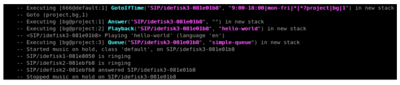
In the above configuration we are using musicass that will play a musiconhold when the callers waiting in the queue, strategy set to “all”, so when caller enters in the queue, the phones on all agents will ring, timeout=10, retry=5, maxlen=1, which means that the Asterisk will let only one caller to wait in the queue, context is the context in which we will call Queue() application, periodic-announce-frequency=60 means how often to make any periodic announcement and periodic-announce=queue calling means that at every 60 seconds it will send a text to the agents - “queue calling”.

5. Queues tricks
1. Penalties
member => SIP/idefisk1,1
member => SIP/idefisk2,2
member => SIP/idefisk3,3
member => SIP/idefisk4,2
If the strategy is defined as 'ringall', then only those available members with the lowest priorities will ring. In the example above, if idefisk1 is not busy, then only idefisk1 will ring. If idefisk1 is busy, then only idefisk2 and idefisk4 will ring. If idefisk1, idefisk2 and idefisk4 are busy, then idefisk3 will ring.
2. Cascading Queues
You can set up a series of queues that cascade to each other. You can get a similar effect by using the penalty feature but this can be a better way to do things for some situations (e.g. if you want to overflow calls to your receptionist into your office for when your receptionist is busy).
The first thing you must do is have a timeout on our queue. This is done as a parameter of the Queue() application used in extensions.conf (example: Queue(simple-queue|t|||30)).
You can then set up a number of queues and simply have your dialplan call each queue in succession.
exten => 1589,1,Answer
exten => 1589,2,Ringing
exten => 1589,3,Wait(2)
exten => 1589,4,Queue(simple-queue|t|||30)
exten => 1589,5,Queue(simple-queue2|t|||30)
exten => 1589,6,Hangup
3. New Features
Queue() applicationhas options for penalty, wrapuptime and priority have been added to the Asterisk queue system. Priority works like this, according to the contributor:
The new addition provides the ability to operate queues as priority queues in addition to the current FIFO mode. This gives the ability to queue a call not at the end of the queue but anywhere in the queue, according to the call's priority.
Now you can have just one queue servicing all the calls (more important and less important) with the right order. The priority of a call entering a queue is determined by a special channel variable, QUEUE_PRIO. Higher values of this variable mean higher priority. By not setting this variable, all calls have the same priority, 0, by default (FIFO). E.g.
; VIP customers
exten => 111,1,Playback(beep)
exten => 111,2,SetVar(QUEUE_PRIO=10)
exten => 111,3,Queue(simple-queue)
; Not-VIP customers
exten => 112,1,Playback(beep)
exten => 112,2,SetVar(QUEUE_PRIO=5)
exten => 112,3,Queue(simple-queue)
4. Call parking
The number used to park a call and the parking extensions are configured in features.conf.
[general]
parkext => 700 ;What extension to dial to park
parkpos => 701-720 ;What extensions to park calls on
By default extension 700 is used to park a call. While in a conversation, press # to initiate a transfer, then dial 700.
Asterisk will now announce the parking extension, most probably 701 or 702. Now hang up - the caller will be left on hold at the announced extention. Walk up to a different phone, dial 701 and voilá- the conversation can be continued. If a caller has been parked for a longer time than the specified time limit then Asterisk will again ring the originally dialed extension.
For simple dialplans first edit features.conf as desired, then put this into your extensions.conf:
include => parkedcalls
If you have a more complex dialplan and want to be able to Goto() a more elaborate 'parkedcalls' handler then you'll need to be sure to include a handler for the 'i' priority to catch calls to parkinglot without call in them as well as the 's' priority to give timeouts somewhere to go, thus:
...
exten => park,3,Goto(parking,${ARG1},1)
...
[parking]
exten => s,1,NoOp(once a parked call times out it will resume here)
...
include => parkedcalls
exten => i,1,Playback(pbx-invalidpark)
exten => i,2,Hangup
6. Queue addons
1. Asteriskguru Queue Statistics – The Asteriskguru queue statistics, is a PHP based program, which gives anyone who uses queues or CDRs overview in Asterisk a deep insight in the quality of the service which is delivered to their customers. It is fully developped by the Asteriskguru developpers.
2. OrderlyQ - is an extension to Asterisk Queues that lets callers hang up, and call back later without losing their place.
3. OrderlyStats - is a dedicated Real Time Call Centre Management platform and Statistics package.
4. QueueMetrics - is an inbound and outbound call center analysis software.
5. OrderlyCalls - is a multi-threaded telephony application server environment, in Java. You can run it stand-alone, inside your own application environment, or inside J2EE Servlet containers such as Tomcat.
6. astGUIclient - is a set of PHP web-based scripts utilizing Javascript and XMLHTTPRequest functions that work through a browser to give real-time information and functionality with nothing more than an internet browser on the client computer.
| Add Comment |
Latest Headlines:
-
T.38 faxing with Zoiper 2.15 is now easier than ever
section: voip software
-
Asterisk 1.4.21 Released
section: Asterisk
-
Asterisk 1.4.20 Released
section: Asterisk
-
Asterisk 1.4.20-rc2 Released
section: Asterisk
-
Asterisk 1.4.20-rc1 Now Available
section: Asterisk
- News Archives (older news)
Latest Tutorials:
-
Sending Fax from Zoiper to Zoiper using T.38
added 08/Dec/2008 18:16
-
VMAuthenticate (dialplan application)
added 01/Mar/2008 15:57
-
Siptronic ST-530
added 06/Nov/2007 17:57
-
Siemens C455 IP hardphone
added 05/Nov/2007 10:24
-
Zoiper
added 22/Oct/2007 17:53
Latest Comments:
-
https://escuelajudicial.ramajudicial.gov...
tutorial: SIP with NAT or Firewalls
-
TR
https://pont.co/u/yanyanaizlehd
htt...
tutorial: SIP with NAT or Firewalls
-
https://forum.melanoma.org/wp-content/up...
tutorial: Playback (dialplan application)
-
https://sparkle.store/demonslayerinfinit...
tutorial: SIP with NAT or Firewalls
-
https://www.scoop.it/topic/cage-warriors...
tutorial: asterisk.conf