


7.1. With PostgreSQL
1. Introduction:
2. Native Mysql, iodbc, unixODBC ?
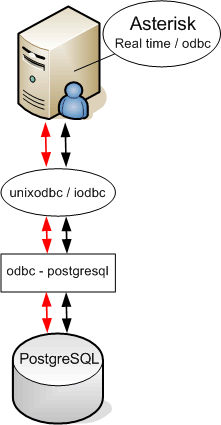
There are two ways you can connect the realtime module to a database .
The first way is to use MySQL driver which is embedded in Asterisk-add ons and the second way is to use ODBC driver which is included in Asterisk HEAD CVS snapshot.
The ODBC driver is by far the best option, its a more general approach to the database, and it supports more than just mysql.
(its also used more, thus tested more, so probably the most stable of the two).
For this tutorial, we use ODBC. Again we have two options, on linux there are two ways for odbc connectivity, called iodbc and unixodbc. We use unixodbc. Also we have to mention that because of some header files duplication you can't use both driver at the same time, you have to choose one of them. Important is that the configuration of both is done in a similar way or with minor changes.
This tutorial is all about odbc with the database pgsql (PostgreSQL),
If we want to use pgsql, we will need not only the odbc apim but also the odbc-postgresql driver.
We will also need to create some things on the database, this will be documented later on in this tutorial.
3. Performance and reliability design question.
If asterisk needs to connect to the database for every step in the dialplan, the database might get very overloaded.
Its little known that Asterisk RealTime can be configured in two different ways:
4. The installation
In this tutorial we will start from a stock debian distribution, but any other distro will do fine, although some small things might be different.
Asterisk and realtime need some additional packages installed.
As we want to have an asterisk version with RealTime support, we need to fetch cvs head from the asterisk CVS server:
The version which we used for this tutorial was - CVS-HEAD-06/03/05-10:59:09.
Choose some directory to put sources and download the source.
We will do everything with kernel 2.6.x
be sure to include following features in the kernel:
Note: In 2.6 kernel you no longer need the usb_uhci module.
If you habe a special processor type you can edit it in Makefile before compiling Asterisk.
For example VIA Samuel 2 processors need to be with PROC=i586 setup in that Makefile otherwise Asterisk will not run.
If this is your first install of Asterisk you can make templates for configuration files needed.
5. UnixODBC configuration
The next step is to configure ODBC driver, in our case UnixODBC.
If you installed from Debian package you can use template files to build the needed config files. The configuration files we need to make odbc work are /etc/odbc.ini and /etc/odbcinst.ini.
astrealtime:~# odbcinst -i -d -f /usr/share/psqlodbc/odbcinst.ini.template
astrealtime:~# cat /usr/share/doc/odbc-postgresql/examples/odbc.ini.template >> /etc/odbc.ini
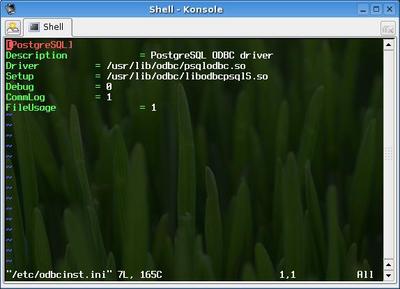

After last two steps we have /etc/odbc.ini and /etc/odbcinst.ini.
6. Configuration of PGSQL
Now we need to include some extra functions and data types in PostgreSQL database to be able to use proper ODBC connectivity.
Now we should create user asterisk and database named asterisk in wich we will put tables which we need for our configuration.
astrealtime:~$ createuser -P -N -d -D asterisk (this is executed in postgres user shell)
astrealtime:~$ createdb asterisk
astrealtime:~$ psql -d asterisk
Now it is time to create tables needed to store configuration in the database.
Creating table extensions_conf:
astrealtime:~$ psql -U asterisk -W -d asterisk
CREATE TABLE extensions_conf (
id serial NOT NULL,
context character varying(20) DEFAULT '' NOT NULL,
exten character varying(20) DEFAULT '' NOT NULL,
priority smallint DEFAULT 0 NOT NULL,
app character varying(20) DEFAULT '' NOT NULL,
appdata character varying(128)
);
Creating table cdr:
CREATE TABLE cdr (
calldate timestamp with time zone DEFAULT now() NOT NULL,
clid character varying(80) DEFAULT '' NOT NULL,
src character varying(80) DEFAULT '' NOT NULL,
dst character varying(80) DEFAULT '' NOT NULL,
dcontext character varying(80) DEFAULT '' NOT NULL,
channel character varying(80) DEFAULT '' NOT NULL,
dstchannel character varying(80) DEFAULT '' NOT NULL,
lastapp character varying(80) DEFAULT '' NOT NULL,
lastdata character varying(80) DEFAULT '' NOT NULL,
duration bigint DEFAULT 0::bigint NOT NULL,
billsec bigint DEFAULT 0::bigint NOT NULL,
disposition character varying(45) DEFAULT '' NOT NULL,
amaflags bigint DEFAULT 0::bigint NOT NULL,
accountcode character varying(20) DEFAULT '' NOT NULL,
uniqueid character varying(32) DEFAULT '' NOT NULL,
userfield character varying(255) DEFAULT '' NOT NULL
);
Creating table sip_conf:
Creating table voicemail_users:
CREATE TABLE voicemail_users (
id serial NOT NULL,
customer_id bigint DEFAULT (0)::bigint NOT NULL,
context character varying(50) DEFAULT '' NOT NULL,
mailbox bigint DEFAULT (0)::bigint NOT NULL,
"password" character varying(4) DEFAULT '0' NOT NULL,
fullname character varying(50) DEFAULT '' NOT NULL,
email character varying(50) DEFAULT '' NOT NULL,
pager character varying(50) DEFAULT '' NOT NULL,
stamp timestamp(6) without time zone NOT NULL
);
Since a week there irealtime support for queues and queue members was added to Asterisk HEAD CVS. Lets also add that...
CREATE TABLE queue_table (
name varchar(128),
musiconhold varchar(128),
announce varchar(128),
context varchar(128),
timeout int8,
monitor_join bool,
monitor_format varchar(128),
queue_youarenext varchar(128),
queue_thereare varchar(128),
queue_callswaiting varchar(128),
queue_holdtime varchar(128),
queue_minutes varchar(128),
queue_seconds varchar(128),
queue_lessthan varchar(128),
queue_thankyou varchar(128),
queue_reporthold varchar(128),
announce_frequency int8,
announce_round_seconds int8,
announce_holdtime varchar(128),
retry int8,
wrapuptime int8,
maxlen int8,
servicelevel int8,
strategy varchar(128),
joinempty varchar(128),
leavewhenempty varchar(128),
eventmemberstatus bool,
eventwhencalled bool,
reportholdtime bool,
memberdelay int8,
weight int8,
timeoutrestart bool,
PRIMARY KEY (name)
) WITHOUT OIDS;
ALTER TABLE queue_table OWNER TO asterisk;
CREATE TABLE queue_member_table
(
queue_name varchar(128),
interface varchar(128),
penalty int8,
PRIMARY KEY (queue_name, interface)
) WITHOUT OIDS;
Granting access levels needed by user asterisk.
GRANT ALL ON TABLE cdr TO asterisk;
GRANT ALL ON TABLE extensions_conf TO asterisk;
GRANT ALL ON TABLE sip_conf TO asterisk;
GRANT ALL ON TABLE voicemail_users TO asterisk;
GRANT ALL ON TABLE queue_member_table TO asterisk;
GRANT ALL ON TABLE queue_table TO asterisk;
Asterisk will connect towards the database with user asterisk so PostgreSQL needs some settings to allow connections to database asterisk.
We should add following lines to file /etc/postgres/pg_hba.conf:
local asterisk asterisk password
host asterisk asterisk 127.0.0.1 255.255.255.255 password
Now it is time to setup asterisk to communicate with the database.
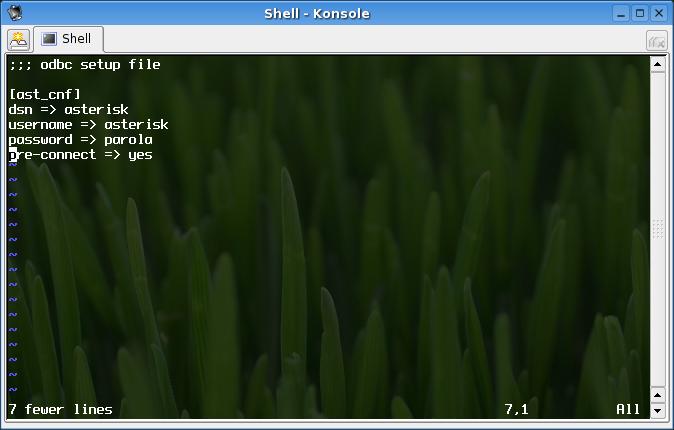
The files we need to configure are /etc/asterisk/res_odbc.conf and /etc/asterisk/extconfig.conf.
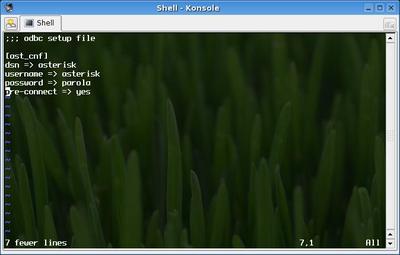
File /etc/asterisk/res_odbc.conf contains configurations for connecting to the database.
Here is an example of the res_odbc.conf file:
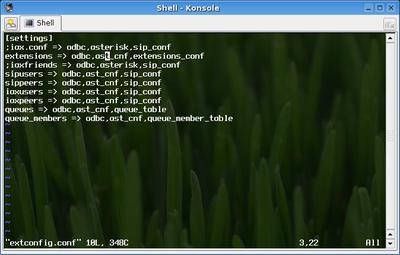
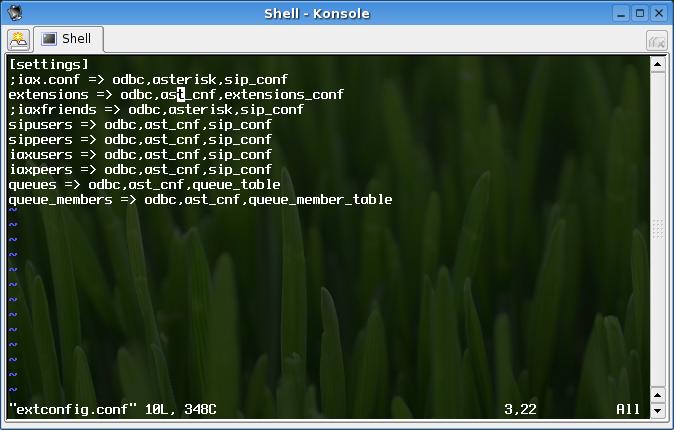
File /etc/asterisk/extconfig.conf contains configurations which define type of database connectivity, families, tables and other important things which will be considered latter.
Here is an example of extconfig.conf file:
Configuration parameters in /etc/asterisk/res_odbc.conf are enough clean to be considered.
Some explanations about extconfig.conf file.
It is important to mention that I will explain only RealTime not RealTime Static configuration.
So in first column stays the family, this is a name associates with RealTime call.
Good names can be:
Only family name for extensions can be different then mentioned
here, every other has to be the same.
Next parameters in conf file are driver, database_context,table_name.
Driver values can be mysql or odbc depends on database back end which we use our example is for odbc.
Database_context is named context which is used in res_odbc.conf file for our example ast_cnf.
Table_name is the table in which we put data.
It is very important to mention that the database_context is not the database name to which we connect it is the context which we use in res_odbc to configure database connection.
One of the things which is not implemented is tracking of available queues stored in database.
Tracking of available queues is possible only after you have Agent registered and logged in the system. In difference of that you can do such tracking when you store configuration about queues in files.
The way you can check this is to execute following command from asterisk CLI:
astrealtime*CLI>show queues
No queues.>
In general the way you can check your system that there is a connection to the database from CLI is:
Checking for odbc connectivity
Checking for record in database and reading it trough realtime module:
astrealtime*CLI>realtime load sipusers name user_name
Possible results could be:
Column Name Column Value
-------------------- --------------------
id 3
name user_name
canreinvite yes
context idefisk
host dynamic
nat no
port 4569
secret bad
type friend
username user_name
disallow all
allow g729
allow ilbc
allow gsm
allow ulaw
allow alaw
regseconds 1117842618
ipaddr 10.3.3.22
cancallforward yes
In short, RealTime provides the possibility to put configuration files in Database Servers.
Its needless to say that this eases the configuration of the asterisk server through external programs, scripts and webpages.
When making changes to the dialplan or the users, there is no need for a reload or a restart, everything is fetched from the database at all times. (this is optional and can be disabled, see later)
Besides the easier interface to other configuration tools, this also allows to have a hot spare server running asterisk, or even an easier load balanced setup.
In general the use of RealTime gives you a flexibility when you store and pull data from Asterisk.
When making changes to the dialplan or the users, there is no need for a reload or a restart, everything is fetched from the database at all times. (this is optional and can be disabled, see later)
Besides the easier interface to other configuration tools, this also allows to have a hot spare server running asterisk, or even an easier load balanced setup.
In general the use of RealTime gives you a flexibility when you store and pull data from Asterisk.
2. Native Mysql, iodbc, unixODBC ?
There are two ways you can connect the realtime module to a database .
The first way is to use MySQL driver which is embedded in Asterisk-add ons and the second way is to use ODBC driver which is included in Asterisk HEAD CVS snapshot.
The ODBC driver is by far the best option, its a more general approach to the database, and it supports more than just mysql.
(its also used more, thus tested more, so probably the most stable of the two).
For this tutorial, we use ODBC. Again we have two options, on linux there are two ways for odbc connectivity, called iodbc and unixodbc. We use unixodbc. Also we have to mention that because of some header files duplication you can't use both driver at the same time, you have to choose one of them. Important is that the configuration of both is done in a similar way or with minor changes.
This tutorial is all about odbc with the database pgsql (PostgreSQL),
If we want to use pgsql, we will need not only the odbc apim but also the odbc-postgresql driver.
We will also need to create some things on the database, this will be documented later on in this tutorial.
3. Performance and reliability design question.
If asterisk needs to connect to the database for every step in the dialplan, the database might get very overloaded.
Its little known that Asterisk RealTime can be configured in two different ways:
Static Realtime
In this case, the data is retrieved from the database server only on startup and on reloads.
The advantage is that the load on the database server is lower, and if the database server goes down, it might not affect your running asterisk.
The big disadvantage is, ... well its not realtime :)
After every change to the database, the asterisk will need to be reloaded.)
Dynamic Realtime
this is the second possibility, here all configuration changes reflect in realtime. But if you database server goes down, so does your voip service.
In this case, the data is retrieved from the database server only on startup and on reloads.
The advantage is that the load on the database server is lower, and if the database server goes down, it might not affect your running asterisk.
The big disadvantage is, ... well its not realtime :)
After every change to the database, the asterisk will need to be reloaded.)
Dynamic Realtime
this is the second possibility, here all configuration changes reflect in realtime. But if you database server goes down, so does your voip service.
4. The installation
In this tutorial we will start from a stock debian distribution, but any other distro will do fine, although some small things might be different.
Asterisk and realtime need some additional packages installed.
Packages needed before installing Asterisk:
Packages needed to include RealTime in Asterisk:
unixodbc (our version is 2.2.4-11)
unixodbc-dev
postgresql (our version is 7.4.7-6sarge1)
postgresql-client
postgresql-contrib
postgresql-dev
odbc-postgresql (our version is 07.03.0200-5)
cvs
libssl-dev
zlib1g-dev
In Debian you can install them with apt-get install <package_name>.
libssl-dev
zlib1g-dev
In Debian you can install them with apt-get install <package_name>.
Packages needed to include RealTime in Asterisk:
unixodbc (our version is 2.2.4-11)
unixodbc-dev
postgresql (our version is 7.4.7-6sarge1)
postgresql-client
postgresql-contrib
postgresql-dev
odbc-postgresql (our version is 07.03.0200-5)
As we want to have an asterisk version with RealTime support, we need to fetch cvs head from the asterisk CVS server:
The version which we used for this tutorial was - CVS-HEAD-06/03/05-10:59:09.
Choose some directory to put sources and download the source.
astrealtime:~# mkdir /usr/src/asterisk
astrealtime:~# cd /usr/src/asterisk
astrealtime:~# export CVSROOT=:pserver:anoncvs@cvs.digium.com:/usr/cvsroot
astrealtime:~# cvs login (password for login on cvs server is "anoncvs")
astrealtime:~# cvs checkout zaptel libpri asterisk (getting CVS HEAD sources)
astrealtime:~# cd /usr/src/asterisk/libpri
astrealtime:~# make
astrealtime:~# make install
astrealtime:~# cd /usr/src/asterisk/zaptel
astrealtime:~# make linux26
astrealtime:~# cd /usr/src/asterisk
astrealtime:~# export CVSROOT=:pserver:anoncvs@cvs.digium.com:/usr/cvsroot
astrealtime:~# cvs login (password for login on cvs server is "anoncvs")
astrealtime:~# cvs checkout zaptel libpri asterisk (getting CVS HEAD sources)
astrealtime:~# cd /usr/src/asterisk/libpri
astrealtime:~# make
astrealtime:~# make install
astrealtime:~# cd /usr/src/asterisk/zaptel
astrealtime:~# make linux26
We will do everything with kernel 2.6.x
be sure to include following features in the kernel:
Device Drivers -> Character Devices -> Enhanced Real Time Clock Support
Library Routines -> CRC-CCITT functions
It is recommended but not necessary to compile them as modules.
Library Routines -> CRC-CCITT functions
It is recommended but not necessary to compile them as modules.
Note: In 2.6 kernel you no longer need the usb_uhci module.
astrealtime:~# make install
astrealtime:~# cd /usr/src/asterisk/asterisk
astrealtime:~# cd /usr/src/asterisk/asterisk
If you habe a special processor type you can edit it in Makefile before compiling Asterisk.
For example VIA Samuel 2 processors need to be with PROC=i586 setup in that Makefile otherwise Asterisk will not run.
astrealtime:~# make
astrealtime:~# make install
astrealtime:~# make templates
astrealtime:~# make install
astrealtime:~# make templates
If this is your first install of Asterisk you can make templates for configuration files needed.
5. UnixODBC configuration
The next step is to configure ODBC driver, in our case UnixODBC.
If you installed from Debian package you can use template files to build the needed config files. The configuration files we need to make odbc work are /etc/odbc.ini and /etc/odbcinst.ini.
astrealtime:~# odbcinst -i -d -f /usr/share/psqlodbc/odbcinst.ini.template
astrealtime:~# cat /usr/share/doc/odbc-postgresql/examples/odbc.ini.template >> /etc/odbc.ini
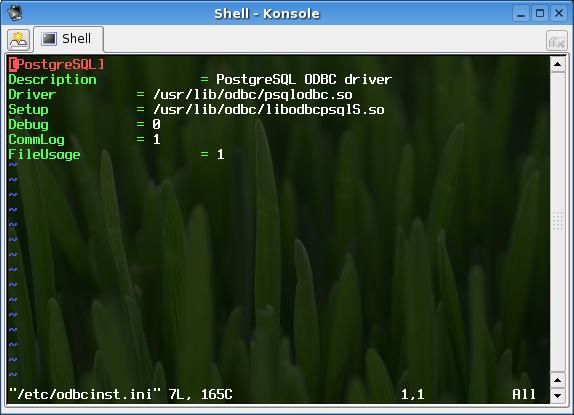
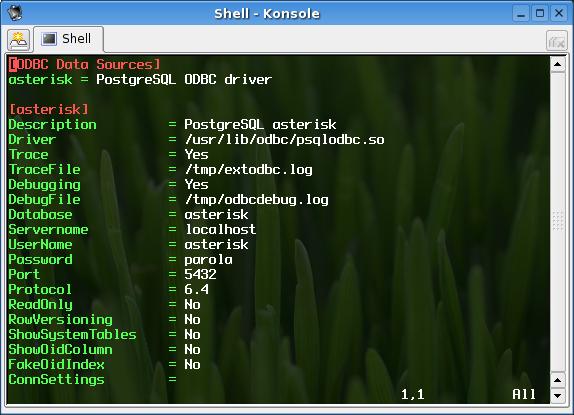
After last two steps we have /etc/odbc.ini and /etc/odbcinst.ini.
6. Configuration of PGSQL
Now we need to include some extra functions and data types in PostgreSQL database to be able to use proper ODBC connectivity.
astrealtime:~# su - postgres
astrealtime:~$ psql -d template1 </usr/share/psqlodbc/odbc.sql
astrealtime:~$ psql -d template1
template1=# CREATE DOMAIN lo AS int4;
astrealtime:~$ psql -d template1 </usr/share/psqlodbc/odbc.sql
astrealtime:~$ psql -d template1
template1=# CREATE DOMAIN lo AS int4;
Now we should create user asterisk and database named asterisk in wich we will put tables which we need for our configuration.
astrealtime:~$ createuser -P -N -d -D asterisk (this is executed in postgres user shell)
astrealtime:~$ createdb asterisk
astrealtime:~$ psql -d asterisk
Now it is time to create tables needed to store configuration in the database.
Creating table extensions_conf:
astrealtime:~$ psql -U asterisk -W -d asterisk
CREATE TABLE extensions_conf (
id serial NOT NULL,
context character varying(20) DEFAULT '' NOT NULL,
exten character varying(20) DEFAULT '' NOT NULL,
priority smallint DEFAULT 0 NOT NULL,
app character varying(20) DEFAULT '' NOT NULL,
appdata character varying(128)
);
Creating table cdr:
CREATE TABLE cdr (
calldate timestamp with time zone DEFAULT now() NOT NULL,
clid character varying(80) DEFAULT '' NOT NULL,
src character varying(80) DEFAULT '' NOT NULL,
dst character varying(80) DEFAULT '' NOT NULL,
dcontext character varying(80) DEFAULT '' NOT NULL,
channel character varying(80) DEFAULT '' NOT NULL,
dstchannel character varying(80) DEFAULT '' NOT NULL,
lastapp character varying(80) DEFAULT '' NOT NULL,
lastdata character varying(80) DEFAULT '' NOT NULL,
duration bigint DEFAULT 0::bigint NOT NULL,
billsec bigint DEFAULT 0::bigint NOT NULL,
disposition character varying(45) DEFAULT '' NOT NULL,
amaflags bigint DEFAULT 0::bigint NOT NULL,
accountcode character varying(20) DEFAULT '' NOT NULL,
uniqueid character varying(32) DEFAULT '' NOT NULL,
userfield character varying(255) DEFAULT '' NOT NULL
);
Creating table sip_conf:
CREATE TABLE sip_conf (
id serial NOT NULL,
name character varying(80) DEFAULT '' NOT NULL,
accountcode character varying(20),
amaflags character varying(7),
callgroup character varying(10),
callerid character varying(80),
canreinvite character varying(3) DEFAULT 'yes',
context character varying(80),
defaultip character varying(15),
dtmfmode character varying(7),
fromuser character varying(80),
fromdomain character varying(80),
host character varying(31) DEFAULT '' NOT NULL,
insecure character varying(4),
"language" character varying(2),
mailbox character varying(50),
md5secret character varying(80),
nat character varying(5) DEFAULT 'no' NOT NULL,
permit character varying(95),
deny character varying(95),
mask character varying(95),
pickupgroup character varying(10),
port character varying(5) DEFAULT '' NOT NULL,
qualify character varying(3),
restrictcid character varying(1),
rtptimeout character varying(3),
rtpholdtimeout character varying(3),
secret character varying(80),
"type" character varying DEFAULT 'friend' NOT NULL,
username character varying(80) DEFAULT '' NOT NULL,
disallow character varying(100) DEFAULT 'all',
allow character varying(100) DEFAULT 'g729;ilbc;gsm;ulaw;alaw',
musiconhold character varying(100),
regseconds bigint DEFAULT 0::bigint NOT NULL,
ipaddr character varying(15) DEFAULT '' NOT NULL,
regexten character varying(80) DEFAULT '' NOT NULL,
cancallforward character varying(3) DEFAULT 'yes'
);
id serial NOT NULL,
name character varying(80) DEFAULT '' NOT NULL,
accountcode character varying(20),
amaflags character varying(7),
callgroup character varying(10),
callerid character varying(80),
canreinvite character varying(3) DEFAULT 'yes',
context character varying(80),
defaultip character varying(15),
dtmfmode character varying(7),
fromuser character varying(80),
fromdomain character varying(80),
host character varying(31) DEFAULT '' NOT NULL,
insecure character varying(4),
"language" character varying(2),
mailbox character varying(50),
md5secret character varying(80),
nat character varying(5) DEFAULT 'no' NOT NULL,
permit character varying(95),
deny character varying(95),
mask character varying(95),
pickupgroup character varying(10),
port character varying(5) DEFAULT '' NOT NULL,
qualify character varying(3),
restrictcid character varying(1),
rtptimeout character varying(3),
rtpholdtimeout character varying(3),
secret character varying(80),
"type" character varying DEFAULT 'friend' NOT NULL,
username character varying(80) DEFAULT '' NOT NULL,
disallow character varying(100) DEFAULT 'all',
allow character varying(100) DEFAULT 'g729;ilbc;gsm;ulaw;alaw',
musiconhold character varying(100),
regseconds bigint DEFAULT 0::bigint NOT NULL,
ipaddr character varying(15) DEFAULT '' NOT NULL,
regexten character varying(80) DEFAULT '' NOT NULL,
cancallforward character varying(3) DEFAULT 'yes'
);
Creating table voicemail_users:
CREATE TABLE voicemail_users (
id serial NOT NULL,
customer_id bigint DEFAULT (0)::bigint NOT NULL,
context character varying(50) DEFAULT '' NOT NULL,
mailbox bigint DEFAULT (0)::bigint NOT NULL,
"password" character varying(4) DEFAULT '0' NOT NULL,
fullname character varying(50) DEFAULT '' NOT NULL,
email character varying(50) DEFAULT '' NOT NULL,
pager character varying(50) DEFAULT '' NOT NULL,
stamp timestamp(6) without time zone NOT NULL
);
Since a week there irealtime support for queues and queue members was added to Asterisk HEAD CVS. Lets also add that...
CREATE TABLE queue_table (
name varchar(128),
musiconhold varchar(128),
announce varchar(128),
context varchar(128),
timeout int8,
monitor_join bool,
monitor_format varchar(128),
queue_youarenext varchar(128),
queue_thereare varchar(128),
queue_callswaiting varchar(128),
queue_holdtime varchar(128),
queue_minutes varchar(128),
queue_seconds varchar(128),
queue_lessthan varchar(128),
queue_thankyou varchar(128),
queue_reporthold varchar(128),
announce_frequency int8,
announce_round_seconds int8,
announce_holdtime varchar(128),
retry int8,
wrapuptime int8,
maxlen int8,
servicelevel int8,
strategy varchar(128),
joinempty varchar(128),
leavewhenempty varchar(128),
eventmemberstatus bool,
eventwhencalled bool,
reportholdtime bool,
memberdelay int8,
weight int8,
timeoutrestart bool,
PRIMARY KEY (name)
) WITHOUT OIDS;
ALTER TABLE queue_table OWNER TO asterisk;
CREATE TABLE queue_member_table
(
queue_name varchar(128),
interface varchar(128),
penalty int8,
PRIMARY KEY (queue_name, interface)
) WITHOUT OIDS;
Granting access levels needed by user asterisk.
GRANT ALL ON TABLE cdr TO asterisk;
GRANT ALL ON TABLE extensions_conf TO asterisk;
GRANT ALL ON TABLE sip_conf TO asterisk;
GRANT ALL ON TABLE voicemail_users TO asterisk;
GRANT ALL ON TABLE queue_member_table TO asterisk;
GRANT ALL ON TABLE queue_table TO asterisk;
Asterisk will connect towards the database with user asterisk so PostgreSQL needs some settings to allow connections to database asterisk.
We should add following lines to file /etc/postgres/pg_hba.conf:
local asterisk asterisk password
host asterisk asterisk 127.0.0.1 255.255.255.255 password
Now it is time to setup asterisk to communicate with the database.
The files we need to configure are /etc/asterisk/res_odbc.conf and /etc/asterisk/extconfig.conf.
File /etc/asterisk/res_odbc.conf contains configurations for connecting to the database.
Here is an example of the res_odbc.conf file:
File /etc/asterisk/extconfig.conf contains configurations which define type of database connectivity, families, tables and other important things which will be considered latter.
Here is an example of extconfig.conf file:
Configuration parameters in /etc/asterisk/res_odbc.conf are enough clean to be considered.
Some explanations about extconfig.conf file.
It is important to mention that I will explain only RealTime not RealTime Static configuration.
So in first column stays the family, this is a name associates with RealTime call.
Good names can be:
extensions
sipusers
sippeers
iaxusers
iaxpeers
queues
queue_members
sipusers
sippeers
iaxusers
iaxpeers
queues
queue_members
Only family name for extensions can be different then mentioned
here, every other has to be the same.
Next parameters in conf file are driver, database_context,table_name.
Driver values can be mysql or odbc depends on database back end which we use our example is for odbc.
Database_context is named context which is used in res_odbc.conf file for our example ast_cnf.
Table_name is the table in which we put data.
It is very important to mention that the database_context is not the database name to which we connect it is the context which we use in res_odbc to configure database connection.
One of the things which is not implemented is tracking of available queues stored in database.
Tracking of available queues is possible only after you have Agent registered and logged in the system. In difference of that you can do such tracking when you store configuration about queues in files.
The way you can check this is to execute following command from asterisk CLI:
astrealtime*CLI>show queues
No queues.>
In general the way you can check your system that there is a connection to the database from CLI is:
Checking for odbc connectivity
astrealtime*CLI>odbc show
Possible result from the command can be:
Name: ast_cnf
DSN: asterisk
Connected: yes
Possible result from the command can be:
Name: ast_cnf
DSN: asterisk
Connected: yes
Checking for record in database and reading it trough realtime module:
astrealtime*CLI>realtime load sipusers name user_name
Column Name Column Value
-------------------- --------------------
id 3
name user_name
canreinvite yes
context idefisk
host dynamic
nat no
port 4569
secret bad
type friend
username user_name
disallow all
allow g729
allow ilbc
allow gsm
allow ulaw
allow alaw
regseconds 1117842618
ipaddr 10.3.3.22
cancallforward yes
| Add Comment |
Latest Headlines:
-
T.38 faxing with Zoiper 2.15 is now easier than ever
section: voip software
-
Asterisk 1.4.21 Released
section: Asterisk
-
Asterisk 1.4.20 Released
section: Asterisk
-
Asterisk 1.4.20-rc2 Released
section: Asterisk
-
Asterisk 1.4.20-rc1 Now Available
section: Asterisk
- News Archives (older news)
Latest Tutorials:
-
Sending Fax from Zoiper to Zoiper using T.38
added 08/Dec/2008 18:16
-
VMAuthenticate (dialplan application)
added 01/Mar/2008 15:57
-
Siptronic ST-530
added 06/Nov/2007 17:57
-
Siemens C455 IP hardphone
added 05/Nov/2007 10:24
-
Zoiper
added 22/Oct/2007 17:53
Latest Comments:
-
https://pont.co/u/musuhdalamselimutmovie...
tutorial: SIP with NAT or Firewalls
-
https://paiza.io/projects/Df53DzgV2CoJfd...
tutorial: Request to schedule in the past?!?!
-
https://www.kompasiana.com/omghelow2139/...
tutorial: Read (dialplan application)
-
https://mlink.cc/iseayouthaidub
https:/...
tutorial: Installation of Asterisk GUI
-
https://brugge.arenal.be/sites/arenal/fi...
tutorial: RemoveQueueMember (dialplan application)