


6.1.2.70. RxFax (dialplan application)
1. RxFax - this application allows you to send faxes from a Fax machine to the Asterisk
NOTE: This application is optional. In order to use it, you have to install additional packages to your system. For more information about them, please read our tutorial about the sending and receiving faxes with spandsp. RxFax is tested with the Asterisk CVS_HEAD version.
Syntax:
List of the possible options
Variables connected with the application
Purpose and usage
Prerequisites
Asterisk PBX configurations
sip.conf Configurations
extensions.conf Configurations
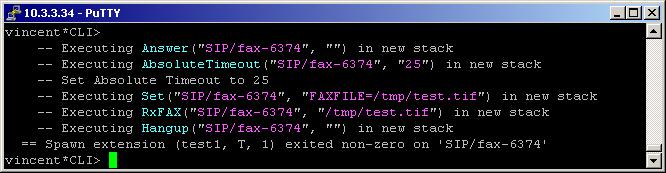
2. Screenshot of what you can see on the CLI of the Asterisk PBX
3. Additional information
4. Uploaded files
5. Similar dialplan applications
NOTE: This application is optional. In order to use it, you have to install additional packages to your system. For more information about them, please read our tutorial about the sending and receiving faxes with spandsp. RxFax is tested with the Asterisk CVS_HEAD version.
Syntax:
RxFax(filename[|caller][|debug])
List of the possible options
filename - specify the name of the file, where you would like the fax to be stored.
caller - this option makes the application to behave as a calling machine, rather than an answering machine. If you do not specify this option the application will behave as an answering machine.
debug -
caller - this option makes the application to behave as a calling machine, rather than an answering machine. If you do not specify this option the application will behave as an answering machine.
debug -
Variables connected with the application
LOCALSTATIONID - used by to application to identify itself to the remote end
LOCALHEADERINFO - used to generate a header line on each page
REMOTESTATIONID - set by the application, the sender CSID
FAXPAGES - set the number of pages received
FAXBITRATE - set the transmission rate
FAXRESOLUTION - set the resolution
LOCALHEADERINFO - used to generate a header line on each page
REMOTESTATIONID - set by the application, the sender CSID
FAXPAGES - set the number of pages received
FAXBITRATE - set the transmission rate
FAXRESOLUTION - set the resolution
Purpose and usage
The purpose of this application is to allow you to send faxes from a fax machine to the Asterisk and to store it into a file.
Below, we will give you an example.
Below, we will give you an example.
Prerequisites
You need a working Asterisk PBX with registered user in the sip.conf file and made extensions. Also, you need a fax machine and an ATA device.
NOTE: Do not forget that you need an installed libtiff and spandsp. For more information, please check our tutorial about the sending and receiving faxes with spandsp, where you can learn how to install this packages.
NOTE:We will use Asterisk CVS HEAD version. Our fax machine is Brother FAX-T94. The ATA device is Grandstream HandyTone-486 - the firmware is 1.0.6.2. To learn more about the configuration of this ATA device please take a look at our tutorial
NOTE: Do not forget that you need an installed libtiff and spandsp. For more information, please check our tutorial about the sending and receiving faxes with spandsp, where you can learn how to install this packages.
NOTE:We will use Asterisk CVS HEAD version. Our fax machine is Brother FAX-T94. The ATA device is Grandstream HandyTone-486 - the firmware is 1.0.6.2. To learn more about the configuration of this ATA device please take a look at our tutorial
Asterisk PBX configurations
sip.conf Configurations
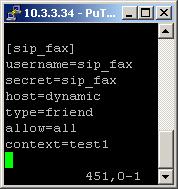
We need one registered user in the sip.conf file.
So, we have registered the user sip_fax.
Type=friend means that this user can make and receive calls. Host=dynamic means that the IP is not static but dynamic through a DHCP server. Allow=all means that the line which this user will use, could support all audio codecs. Context=test1 - this shows that this user is working with the extensions in this context of the configuration file extensions.conf.
IMPORTANT: You can send and receive faxes with spandsp only through the G.711(alaw or ulaw) codecs.
Type=friend means that this user can make and receive calls. Host=dynamic means that the IP is not static but dynamic through a DHCP server. Allow=all means that the line which this user will use, could support all audio codecs. Context=test1 - this shows that this user is working with the extensions in this context of the configuration file extensions.conf.
IMPORTANT: You can send and receive faxes with spandsp only through the G.711(alaw or ulaw) codecs.
extensions.conf Configurations
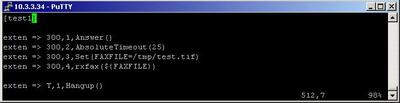
Now lets take a look at the extensions.conf file.
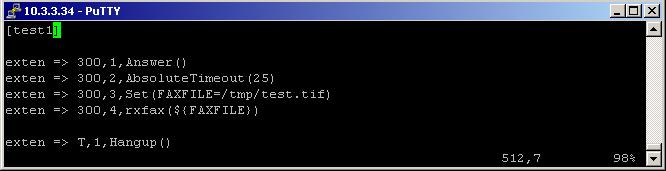
On the picture above you can see our extensions.conf file.
We have the extension 300. This will be the extension on which we will receive the faxes. As you can see the first application is Answer. If you want to receive faxes, you have always to answer the channel by using this application. Only in this way the Asterisk will be overhear for a fax signal.
It seems, that there is a problem with the hanging up after the fax is sent. So, if you put the Hangup application in the extension 300 with priority 5, nothing will happen. So, the solution is to use the AbsoluteTimeout application. As argument in its brackets we have set 25, which means that after 25 seconds the execution will continue with the extension with letter T. T is for AbsoluteTimeout extension. In our case it will execute the Hangup application, which will cause the hanging up of the channel.
Then we have the Set application. Thanks to it we will set the path to and the name of the file, where we would like the fax to be stored. They will be set to the variable, named FAXFILE.
The name of the file is test.tif. The directory where it will be stored is /tmp/.
NOTE: Please be sure that you are allowed to read and write into this directory.
Finally we have the extension with the RxFax application. It will allow us to send a fax from the fax machine to the Asterisk and to store it in a file. As argument in the brackets we have set only the variable ${FAXFILE}, which we have defined in the Set application.
NOTE: Please, pay attention that we define the variable in the Set application, without the ${} characters, BUT we call it in the RxFax application with the ${} characters.
Now, when somebody dials the number 300 from its fax machine and then press the start button, for sending faxes, the Asterisk will first answer the channel, then hear for the fax signal and if there is such one, it will execute the RxFax application.
After the sending, the fax will be stored in the file test.tif in the /tmp directory.
If you set the caller option in the brackets of the RxFax application, then its behavior will be changed. Instead of answering machine, it will become an calling machine. In other words, if you want to receive a fax you have to called it by dialing the fax machine from the CLI. In this case you will receive again the fax on your Asterisk
In order to be sure that the Asterisk PBX will hang up the line after the conversation is over, it is a good idea to make an extension for hanging up the line.
We have the extension 300. This will be the extension on which we will receive the faxes. As you can see the first application is Answer. If you want to receive faxes, you have always to answer the channel by using this application. Only in this way the Asterisk will be overhear for a fax signal.
It seems, that there is a problem with the hanging up after the fax is sent. So, if you put the Hangup application in the extension 300 with priority 5, nothing will happen. So, the solution is to use the AbsoluteTimeout application. As argument in its brackets we have set 25, which means that after 25 seconds the execution will continue with the extension with letter T. T is for AbsoluteTimeout extension. In our case it will execute the Hangup application, which will cause the hanging up of the channel.
Then we have the Set application. Thanks to it we will set the path to and the name of the file, where we would like the fax to be stored. They will be set to the variable, named FAXFILE.
The name of the file is test.tif. The directory where it will be stored is /tmp/.
NOTE: Please be sure that you are allowed to read and write into this directory.
Finally we have the extension with the RxFax application. It will allow us to send a fax from the fax machine to the Asterisk and to store it in a file. As argument in the brackets we have set only the variable ${FAXFILE}, which we have defined in the Set application.
NOTE: Please, pay attention that we define the variable in the Set application, without the ${} characters, BUT we call it in the RxFax application with the ${} characters.
Now, when somebody dials the number 300 from its fax machine and then press the start button, for sending faxes, the Asterisk will first answer the channel, then hear for the fax signal and if there is such one, it will execute the RxFax application.
After the sending, the fax will be stored in the file test.tif in the /tmp directory.
If you set the caller option in the brackets of the RxFax application, then its behavior will be changed. Instead of answering machine, it will become an calling machine. In other words, if you want to receive a fax you have to called it by dialing the fax machine from the CLI. In this case you will receive again the fax on your Asterisk
In order to be sure that the Asterisk PBX will hang up the line after the conversation is over, it is a good idea to make an extension for hanging up the line.
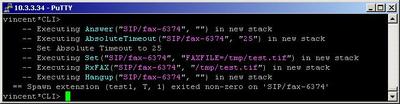
2. Screenshot of what you can see on the CLI of the Asterisk PBX
3. Additional information
For more information about extensions.conf you can check here.
For more information about sip.conf you can check here.
This application is tested with Brother FAX-T94 fax machine and Asterisk CVS HEAD version. They are connected through Grandstream HandyTone-486 ATA (firmware 1.0.6.2).
For more information about sip.conf you can check here.
This application is tested with Brother FAX-T94 fax machine and Asterisk CVS HEAD version. They are connected through Grandstream HandyTone-486 ATA (firmware 1.0.6.2).
4. Uploaded files
5. Similar dialplan applications
| Add Comment |
Latest Headlines:
-
T.38 faxing with Zoiper 2.15 is now easier than ever
section: voip software
-
Asterisk 1.4.21 Released
section: Asterisk
-
Asterisk 1.4.20 Released
section: Asterisk
-
Asterisk 1.4.20-rc2 Released
section: Asterisk
-
Asterisk 1.4.20-rc1 Now Available
section: Asterisk
- News Archives (older news)
Latest Tutorials:
-
Sending Fax from Zoiper to Zoiper using T.38
added 08/Dec/2008 18:16
-
VMAuthenticate (dialplan application)
added 01/Mar/2008 15:57
-
Siptronic ST-530
added 06/Nov/2007 17:57
-
Siemens C455 IP hardphone
added 05/Nov/2007 10:24
-
Zoiper
added 22/Oct/2007 17:53
Latest Comments:
-
https://partybusexpress.com/wp-content/u...
tutorial: SIP with NAT or Firewalls
-
https://1link.jp/onebattleafteranother20...
tutorial: SIP with NAT or Firewalls
-
https://ppshi.org/wp-content/uploads/for...
tutorial: Basic Information
-
https://ppshi.org/wp-content/uploads/for...
tutorial: Basic Information
-
https://irwincounty-ga.gov/wp-content/up...
tutorial: SIP with NAT or Firewalls